
As winter arrives and temperatures drop sharply, many print professionals notice their equipment acting up: photo printers produce skewed or scattered prints, large-format printers experience thread breaks or nozzle clogs, and UV printers face ink interruptions and decreased precision. This guide covers winter inkjet printer maintenance tips for photo printers, large-format printers, and UV printers, helping your equipment run smoothly and print reliably during the cold season.
1. Eco-Solvent Inkjet Printer Maintenance in Winter
Common winter issues for eco-solvent printers include ink scattering, skewed printing, blurred images, and clogged nozzles. Low temperatures increase ink viscosity, slow nozzle response, and make circuits more susceptible to static damage. Here’s a guide on eco-solvent inkjet printer maintenance during winter:
1.1 Environment Control
- Optimal operating temperature: 15℃–30℃; humidity: 35%–65%. Temperatures below 10℃ may lead to high ink viscosity and slow nozzle response.
- Preheating: Turn on air conditioning or a heater at least 1 hour before operation to avoid running the printer cold at full load.
1.2 Static Electricity Protection
- Static can cause ink scattering, leakage, and damage to mainboards and nozzles.
- Proper grounding: Use a ≥ 4 mm copper wire from the machine frame to a ground point 1.5–2 m deep; do not share grounding with high-voltage devices.
- Humidity control: Maintaining > 45% humidity helps reduce static.
- Anti-static consumables: Materials like imported fluororubber rollers can help prevent static-related issues.
1.3 Ink Management
- Use original or high-quality, weather-resistant inks to reduce nozzle clogging in low temperatures.
- Store inks at 15℃–30℃ to prevent freezing or deterioration.
- Print a test pattern before operation; if lines break, clean the nozzle with appropriate cleaning fluid.
1.4 Printer Parts Maintenance
- Nozzle base: Weekly cleaning with a cotton swab and cleaning fluid.
- Wiper blade: Clean every 10 days to prevent ink buildup.
- Raster/encoder strip: Clean monthly with distilled water to avoid ghosting or misalignment.
- Rails: Lubricate weekly for smooth carriage movement.
- Belts: Inspect every 3 months; replace if worn.
2. Solvent Inkjet Printer Maintenance in Winter
Solvent printers are used for outdoor advertising and wide-format graphics. Winter conditions may lead to mechanical contraction and poor ink flow.
2.1 Temperature Control
- Maintain 15℃–25℃ to prevent high ink viscosity, nozzle clogging, or mechanical deformation.
- Use heaters or air conditioning to maintain a stable temperature and minimize fluctuations.
2.2 Humidity Control
- Maintain a relative humidity level of 40%–60% to prevent static and ensure optimal print quality.
- Industrial humidifiers (4–6 L/h) can be used; adjust based on ventilation.
2.3 Ink Management
- Use inks suitable for winter with moderate viscosity and good flow.
- If the flow is insufficient, gently warm the ink cartridges or supply tanks to 20–25℃.
- Store ink properly to avoid freezing or degradation.
2.4 Nozzle Care
- Clean the nozzle after each print with a dedicated cleaning fluid.
- For minor clogs, use the printer’s cleaning cycle or manual suction carefully to avoid damage.
- If unused for long periods, seal or maintain nozzle moisture regularly.
2.5 Mechanical Maintenance
- Inspect and clean lead screws and rails; apply lubricants as needed.
- Check drive shafts and gears for wear; replace or repair if necessary.
- Ensure the printer is on a level surface to avoid uneven stress affecting print accuracy.
2.6 Static Protection
- Ensure reliable grounding with intact connection wires.
- Use smooth-surface media to reduce friction-generated static.
- Operators should wear anti-static wristbands or touch grounded objects before handling equipment.
3. UV Printer Maintenance in Winter
UV printers are highly sensitive to temperature and humidity. Understanding UV inkjet printer maintenance principles—like preheating, nozzle cleaning, and system maintenance—can help keep UV printers running smoothly in winter.
3.1 Temperature and Humidity
- Optimal temperature: 20℃–28℃, minimum 18℃.
- Humidity: 35%–65%; higher humidity (50%–70%) helps reduce static and slow UV ink evaporation. Avoid directing humidifier airflow onto circuit boards.
3.2 Nozzle Maintenance
- Daily use: Preheat 10–15 minutes; clean nozzles weekly with brand-recommended fluid. Do not mix fluids from different brands.
- Short-term idle (7–20 days): Drain ink, and keep nozzles dry and dust-free.
- Long-term idle (20+ days): Flush with cleaning fluid every 20–30 days.
3.3 System Maintenance
- Mechanical parts: Monthly lubrication of X/Y rails and lead screws; clean dust covers.
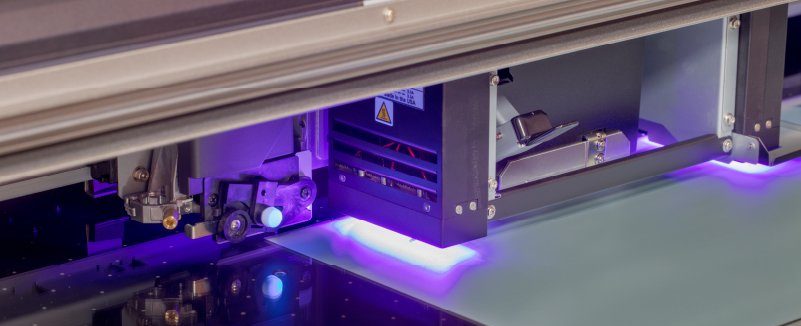
- UV lamps: Wipe lamp covers weekly; replace lamps as per manufacturer instructions to maintain curing power.
- Ink system: Replace pumps and filters, and check for leaks to prevent corrosion.
- Worktable: Clean residual ink after use with neutral cleaner.
4. Printer Maintenance General Rules in Winter
Regardless of equipment type, these practices can significantly reduce winter breakdowns:
- Environmental control: Maintain recommended temperature and humidity.
- Ink management: Use quality, low-temperature-resistant inks and store properly.
- Static prevention: Follow grounding protocols and anti-static procedures.
- Nozzle care: Keep nozzles moist daily and clean regularly.
- Mechanical inspection: Clean and lubricate rails and lead screws periodically.
- Preheating: Never run equipment cold at full load; allow sufficient warm-up time.
Winter maintenance is crucial for printing equipment. Applying the principles of how to maintain inkjet printers, along with proper temperature, humidity, static control, nozzle care, and mechanical inspection ensures smooth operation and extends equipment life. For complex issues, always consult professional technicians.


