
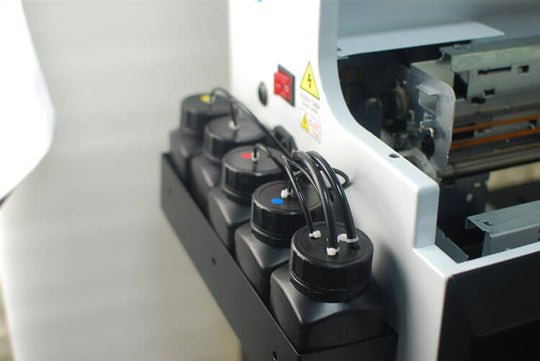
Nowadays, products printed by UV printers can be found in all walks of life. However, when using UV printers, we must pay attention not only to the maintenance of the UV printer's printhead and the machine but also to certain parts that require careful maintenance, including the UV ink cartridge. But what should be paid attention to in the maintenance of the ink cartridge? Does everyone know? Let's take a look!
First, Clean and Replace the UV Ink in Time
Before replacing the ink, start by cleaning and inspecting the UV ink cartridge. After cleaning, make sure it is completely dry and free of air. When changing the ink, pay close attention to any residual ink left in the ink supply lines—clean and flush them thoroughly. Finally, replace the ink, taking care not to mix different types of ink to avoid damage or clogging.
Second, Thoroughly Clean and Maintain the Ink Supply System
The ink supply system consists of components such as the mainboard, main ink cartridge, ink supply pump, filter, auxiliary ink cartridge, ink tubes, and liquid level sensor. To ensure the liquid level sensor functions properly, it's essential to thoroughly clean and remove dust or contaminants from all relevant parts of the system. In UV printers, the printhead (nozzle) plays a key role in ink transfer and requires special attention during maintenance. Since it is easily affected by dust, ink residue, and stains, regular cleaning and unclogging with the recommended cleaning solution are necessary to maintain optimal performance.
Third, Use Qualified Ink and Ensure the Correct Ink Adding Operation
UV inks have specific levels of acidity or alkalinity, so it's important to choose an ink that is specially formulated and qualified for UV printers. Avoid mixing inks of different colors or batches in the same cartridge, as this can trigger chemical reactions that may harm both the cartridge and the printer. Additionally, always ensure there is enough ink in the cartridge—running the printer with low ink can cause dry burning, which may damage cartridge components.
P.S. Using high-quality ink not only improves print quality but also provides a degree of protection for the ink cartridge itself.
Fourth, Replace the UV Ink Cartridge Regularly
After multiple ink refills, some impurities or dust may inevitably enter the ink cartridge. As the ink circulates, these particles get trapped and accumulate on the ink cartridge filter. Over time, this buildup can clog the filter, leading to restricted ink flow and poor print quality. If the filter becomes fully blocked, it may cause serious issues such as printing failure or complete stoppage. Therefore, after extended use, it's recommended to replace the UV ink cartridge. If low-quality ink is used, more frequent cartridge replacement is advisable to prevent malfunctions and maintain optimal performance.


