
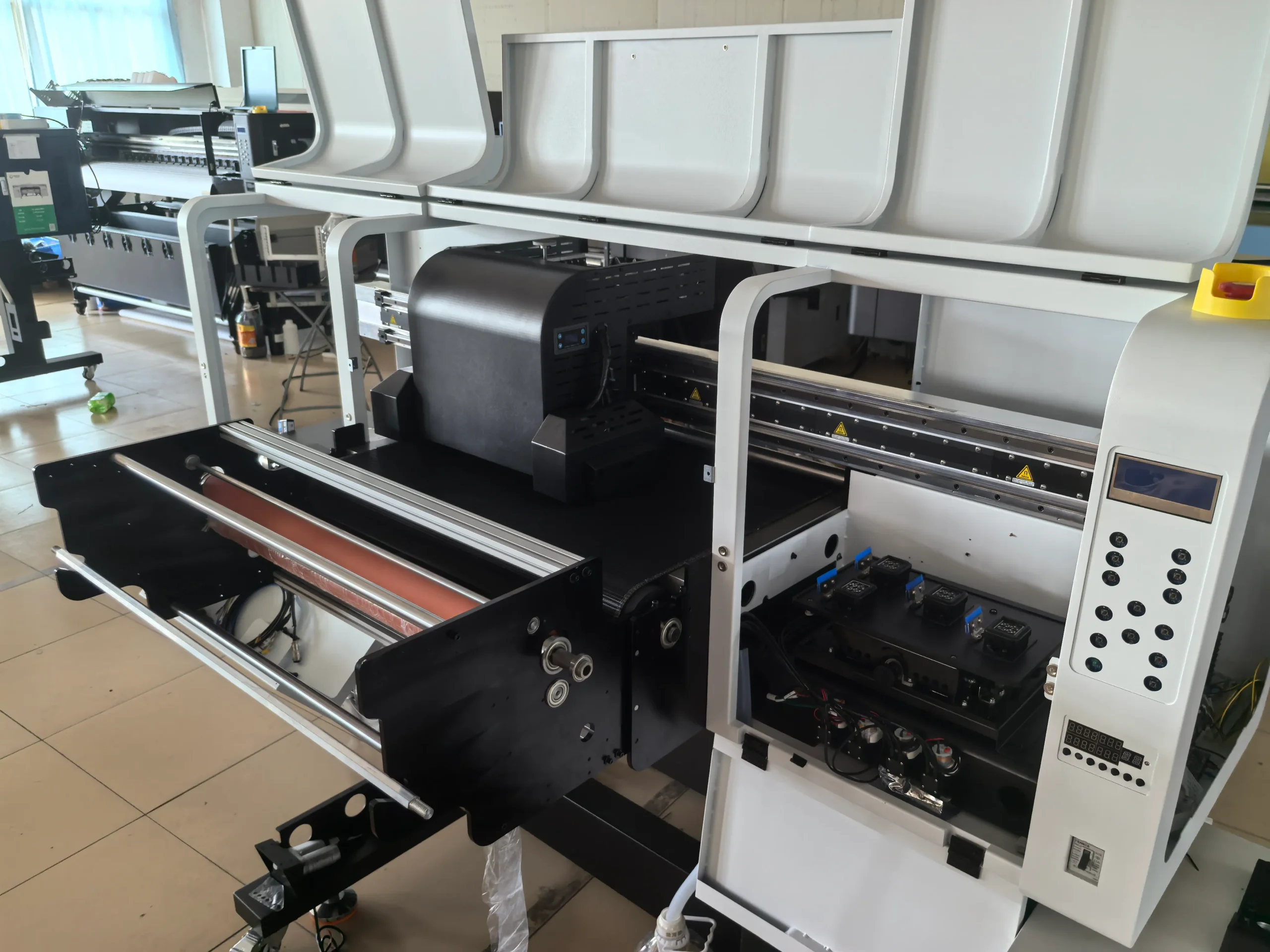
UV DTF printing allows colorful, durable designs to be transferred onto glass, acrylic, metal, plastic, wood, ceramics, and other hard surfaces.
A UV DTF printer combines UV ink, printheads, curing lamps, adhesive film, and a laminating system. Because these components must work together accurately, poor UV DTF printer maintenance can quickly cause clogged nozzles, weak white ink, film misalignment, incomplete curing, and production downtime.
This guide covers the essential maintenance schedule, common replacement parts, and practical troubleshooting methods for keeping a UV DTF printer running reliably.
Understanding the UV DTF Printer
How UV DTF Printers Work
A UV DTF printer prints CMYK ink, white ink, and optional varnish onto adhesive A film. UV lamps cure the ink immediately, and the printed film is laminated with B film.
The finished design is then transferred onto a clean hard surface without a traditional heat press.
The main workflow is:
- Print the design onto A film.
- Cure the ink with UV light.
- Laminate the printed film with B film.
- Apply the design to the target product.
- Remove the transfer film.
Stable ink flow, accurate film feeding, and correct UV curing are essential throughout the process.
Why UV DTF Printer Maintenance Matters
Regular maintenance helps prevent:
- Clogged printhead nozzles
- Inconsistent white ink
- Horizontal banding
- Film wrinkles and jams
- Sticky or under-cured prints
- Poor transfer adhesion
- Unexpected machine downtime
Preventive maintenance is also less expensive than replacing a printhead or repairing a damaged ink system.
Main Components of a UV DTF Printer
Printhead
The printhead controls ink droplet placement and directly affects image sharpness, color, and white ink coverage.
Capping Station and Wiper
The cap top seals the printhead during idle periods, while the wiper removes excess ink from the nozzle surface.
Ink Delivery System
The ink system includes tanks, tubes, dampers, filters, pumps, and negative-pressure components.
White Ink Circulation System
White UV ink contains heavy pigment that can settle. Circulation and agitation help maintain stable white ink output.
UV Lamp
The UV lamp cures the ink. Weak curing may leave the print sticky, while excessive curing may make the transfer brittle.
Film Feeding and Laminating System
Rollers, motors, and tension controls keep A film and B film moving smoothly and aligned correctly.
Encoder Strip and Carriage System
The encoder strip helps the printer determine carriage position. Dust or ink contamination may cause image shifting or double printing.
UV DTF Printer Maintenance Schedule
Daily Maintenance
Daily maintenance should be completed before and after production.
Before Printing
- Check CMYK, white ink, and varnish levels.
- Confirm that white ink circulation is working.
- Inspect the waste ink container.
- Check that A film and B film are loaded correctly.
- Run a nozzle test.
- Clean dust from the film path and printer surface.
Do not begin customer production if the nozzle test shows serious missing lines.
During Printing
Monitor:
- White ink density
- Color consistency
- Film alignment
- UV curing
- Laminating pressure
- Unusual machine noise
Stop the printer immediately if the film wrinkles or rises toward the printhead.
After Printing
- Clean the cap top and wiper.
- Remove ink buildup around the printhead area.
- Check the waste ink system.
- Park the carriage correctly.
- Follow the normal shutdown procedure.
Never disconnect the main power while the printer is cleaning or moving.
Weekly Maintenance
Complete the following tasks once a week or more frequently during heavy production:
- Inspect dampers for air bubbles, leakage, or sediment.
- Check ink tubes and connectors.
- Clean film feeding and laminating rollers.
- Clean the UV lamp cover.
- Inspect cooling fans.
- Check white, color, and varnish registration.
- Run bidirectional and step calibration if needed.
- Clean around the carriage and maintenance station.
If automatic cleaning does not recover missing nozzles, inspect the cap top, pump, and dampers before repeating strong cleaning cycles.
Monthly Maintenance
Monthly maintenance should include:
- Inspecting the complete ink delivery system
- Checking white ink pumps and filters
- Cleaning the encoder strip carefully
- Inspecting the carriage belt
- Cleaning and lubricating the carriage rail
- Checking sensors and electrical connections
- Reviewing UV lamp curing performance
- Backing up RIP settings and calibration data
- Reviewing spare-parts inventory
Only use cleaning fluids and lubricants approved for the printer.
Preventive Maintenance vs. Reactive Repairs
Preventive maintenance means replacing or cleaning a component before it causes machine failure.
Examples include:
- Replacing a worn cap top
- Changing a blocked damper
- Cleaning the encoder strip
- Inspecting the white ink circulation pump
- Replacing a damaged wiper
- Correcting film tension
Reactive repair begins after the printer has already stopped or print quality has failed.
A cap top, wiper, or damper is much less expensive than a printhead. Replacing maintenance parts at the right time helps protect more valuable components.
UV DTF Printer Parts That Need Regular Replacement
| Part | Replacement Signs | Possible Problem |
|---|---|---|
| Cap top | Poor sealing or hardened rubber | Nozzle drying |
| Wiper | Cracks or ink buildup | Dirty nozzle surface |
| Damper | Air bubbles or weak flow | Missing nozzles |
| Ink filter | Pigment buildup | Restricted ink supply |
| Ink tube | Cracks or leakage | Air entering the system |
| Ink pump | Weak suction | Failed cleaning |
| White ink pump | Poor circulation | Uneven white ink |
| Roller | Slipping or uneven pressure | Film misalignment |
| Carriage belt | Loose or worn | Image shifting |
| UV lamp | Weak curing | Sticky prints |
| Encoder strip | Scratches or contamination | Double images |
| Printhead | Permanent nozzle loss | Poor print quality |
Choosing Compatible UV DTF Printer Parts
Before ordering replacement parts, confirm:
- Printer brand and model
- Printhead model
- Original part number
- Connector type
- Tube diameter
- Pump voltage
- Installation position
- Photos and dimensions
Need UV DTF Printer Parts?
JOHOPE supplies printer parts for UV, UV DTF, DTF, DTG, eco-solvent, and digital textile printers.
Available JOHOPE printer parts may include printheads, dampers, cap tops, wipers, ink pumps, filters, tubes, encoder strips, cables, rollers, motors, UV curing components, and control boards.
Workspace Optimization
A stable workspace improves print consistency and machine reliability.
Recommended conditions include:
- Clean, low-dust production area
- Stable room temperature
- Suitable humidity
- Good ventilation
- Proper electrical grounding
- Stable voltage
- Organized maintenance tools
- Correct ink and film storage
A commonly used operating range is approximately 20–28°C and 40–60% relative humidity, although the printer manufacturer’s recommendation should always take priority.
Complete Troubleshooting Guide
Common UV DTF Printer Problems and Solutions
| Problem | Possible Cause | Recommended Solution |
| Missing nozzles | Clogged printhead, air in damper | Run nozzle check, inspect cap top and damper |
| Horizontal banding | Missing nozzles or incorrect step | Clean printhead and recalibrate feeding |
| Double image | Encoder contamination or alignment error | Clean encoder strip and recalibrate |
| Weak white ink | Pigment settlement or blocked filter | Check circulation, filter and damper |
| Dull colors | Incorrect profile or poor nozzle output | Check ICC profile and nozzle test |
| Sticky print | Insufficient UV curing | Clean lamp cover and check curing settings |
| Brittle transfer | Excessive curing | Reduce UV power or varnish density |
| Poor adhesion | Dirty or incompatible surface | Clean the product and test compatibility |
| Film wrinkles | Incorrect tension or dirty rollers | Reload film and adjust tension |
| Film moves sideways | Uneven roller pressure | Realign rolls and inspect rollers |
| Lamination bubbles | Dust or uneven pressure | Clean film path and adjust laminator |
| Ink dripping | Pressure or damper problem | Stop printing and inspect ink system |
| Printer stops | Sensor, software or power issue | Check error message and connections |
| UV lamp failure | Cable, power, or lamp fault | Inspect safely and contact a technician |
When to Contact a Technician
Professional support is recommended when:
- Ink reaches a control board.
- A printhead cable is burned.
- The printer repeatedly blows a fuse.
- The printhead is not recognized.
- The UV lamp wiring is damaged.
- The carriage has suffered a serious collision.
- Internal printhead leakage is suspected.
- Basic maintenance cannot restore ink flow.
Do not connect or disconnect printhead cables while the printer is powered on.
Frequently Asked Questions
Basic cleaning should be completed every working day. Dampers, tubes, rollers, UV lamps and calibration should be checked weekly or monthly depending on production volume.
Yes. A daily nozzle test helps detect missing or deflected nozzles before customer production begins.
White ink contains a high concentration of pigment that settles easily. Regular circulation, agitation, and filter inspection help maintain stable output.
Only after following the manufacturer’s idle or storage procedure. Long idle periods without circulation or cleaning may permanently block the printhead.
Not unless the printer or printhead manufacturer specifically approves it. Use a compatible UV cleaning solution.
Common causes include weak UV curing, a dirty lamp cover, excessive ink deposition, or incompatible ink and film.
The surface may contain dust, oil, or moisture, or the material may not be compatible with the adhesive film. Always test unfamiliar surfaces before bulk production.
Replace dampers when they show air bubbles, leakage, sediment, deformation, or restricted ink flow.
Useful spare parts include cap tops, wipers, dampers, ink filters, tubes, pumps, cables, sensors, and cleaning supplies.
Conclusion
A reliable UV DTF printer maintenance routine should combine daily cleaning, weekly inspection, and monthly preventive checks.
The most important tasks are maintaining a complete nozzle test, keeping the white ink system circulating, monitoring film feeding, and replacing worn maintenance parts before they damage the printhead.
With correct maintenance, a clean workspace, and compatible replacement parts, a UV DTF printer can deliver more stable output, lower operating costs, and less production downtime.


