The application of eco-solvent ink in small inkjet printers is still expanding, and most of the equipment mainly uses Epson DX5 and DX7 print heads. Despite being familiar with micro-piezoelectric inkjet printing technology, few are aware of the specific differences between these two generations of printheads. Understanding the distinctions between various types of printheads can help guide you toward the machine that best meets your needs. So, which is the better choice among domestic piezoelectric printers: Epson DX5 vs DX7 printhead?
Epson's micro-piezoelectric printhead is specifically designed for printers and is renowned for its advanced technology. As the inkjet printing industry evolves, piezoelectric technology continues to progress. From the early adoption of the DX3 piezoelectric printheads in China to the current Epson DX7 printheads, advancements are made with each iteration.
However, within Epson's system, printheads are not categorized by generation; instead, they are distinguished based on their release date. The labeling of different generations of printheads in China is primarily a convention used by domestic dealers for ease of reference.
What is the Epson DX5 printhead?
The Epson DX5 printhead is a classic choice that is highly regarded in the printing industry. Known for its high precision, speed, and stability, this printhead is a go-to for a variety of applications, including solvent and eco-solvent printers, inkjet printers, and more. Its versatile performance makes it a popular choice among professionals and businesses seeking reliable and efficient printing solutions.
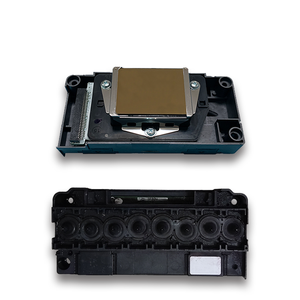
Epson DX5 printheads typically employ primary encryption or secondary encryption when used in solvent printers, and the price is relatively lower. When used in modified universal flatbed printers, unencrypted DX5 heads are generally used. Epson DX5 has been committed to high precision and is famous for its high speed. Epson DX5 printhead specifications:
- The width of the printhead is 24.5 mm. Each printhead has 8 rows of nozzles, each row has 180 nozzles, and the total number of nozzles is 1440.
- The printhead is equipped with a unique wave size connection variable printing technology, which can solve the horizontal lines caused by the passage of the image and make the image lifelike.
- FDT technology: When the amount of ink ejected from a certain nozzle hole decreases, it will immediately get a variable frequency signal to open the nozzle hole.
- The ink droplet size of 3.5 PL enables the resolution of the pattern to reach an astonishing 2880 dpi, which is comparable to the effect of high-definition photos. The thickness is as small as 0.2 mm, as thin as a hair. It is not difficult to imagine that no matter how small the material is, the pattern can be perfectly displayed!
There are many models of Epson DX5 printheads to choose from, among which the gray-surface style is a four-color printhead, and the gold-surface style is a six-color printhead, which can be selected according to actual needs. F160010 (gray-surface) is suitable for Epson 4800, 7450, Mutoh 900C, and 1604; F158010 (gray-surface) is suitable for Epson 2400; F187000 (gold-surface) is suitable for Epson 4880, 7880, and 9880; F186000 (gold-surface, especially suitable for corrosion-resistant plastic parts, also known as oily heads, suitable for domestic machines and EPSON and other occasions that use oily inks) is suitable for Epson 1900; and F138030 (gray-surface) is suitable for Epson 7600 and 9600.
It is worth noting that F158010 and F160010 are universal in models, and F187000 is also suitable for models compatible with F160010. In addition, F186000 is also called oily head because of the corrosion resistance of its plastic parts, which perform particularly well in environments where domestic machines and EPSON use oily inks. When purchasing, you need to pay special attention to the code on the printhead to ensure that you purchase the right model. At the same time, for UV printers, you must choose Epson printheads with a gold surface and corrosion resistance to ensure printing quality and durability of the printhead. A variety of models meet different printing needs.
What is the Epson DX7 printhead?
Epson DX5 printhead specifications:
The width of the printhead is 24.5 mm; each printhead has 8 rows of nozzles, each row has 180 nozzles, and the total number of nozzles is 1440.
The minimum ink dot is 5 PL, a single head supports 4-color or 8-color output, and the cost of use is low.
The service life is about 12 months.
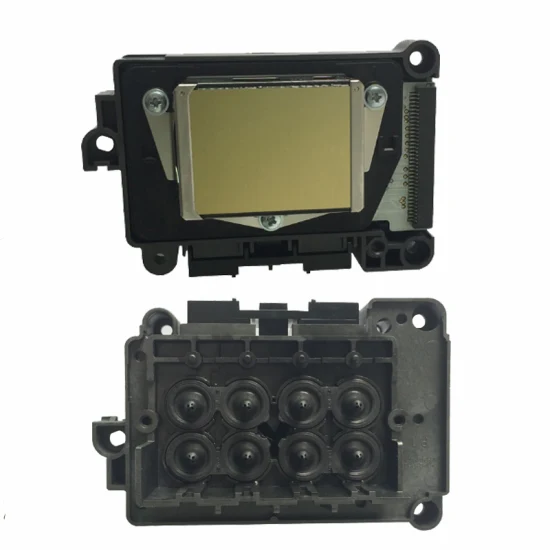
The Epson DX7 (F189010) printhead was produced in 2009. Its design concept is positioned at industrial production. It uses a new piezoelectric crystal, has a longer lifespan, and is more adaptable to temperature. The color saturation is better than that of the DX5 printhead. It can work continuously for a long time without inking, which greatly improves production efficiency and reduces production costs.
We offer genuine and compatible models with stable supply and fast delivery.
Epson DX5 VS DX7 Printhead
First, let’s clarify the difference between the two:
- Nozzle arrangement. There are 8 rows of nozzles on the surface of the DX5 head, 180 nozzles/row, and the distance between every two rows of nozzles is equal, and the distance between every four nozzles is unequal; while the DX7 head also has 8 rows of nozzles, 180 nozzles/row, with equal spacing between nozzles in each row.
- Application time. In 2005, Epson launched its DX5 printheads, and in 2009, it launched its DX7 printheads. In other words, Epson DX5 has been in use for the longest time, so the technologies in all aspects are quite mature. This type of model has stable performance and strong durability.
- Speed. The speed of the DX7 head is not much different from that of the fDX5 head. After all, they are all micro-voltage inkjet.
- Ink droplets. The highest accuracy of the DX5 head can reach 1440 dpi, with high inkjet accuracy, bright colors, small ink dots, and high fineness; while the DX7 head has large ink dots and is not as fine as the former.
- Price. Nowadays, there are not many supply channels for Epson DX5 heads on the market, but DX7 heads are everywhere. Therefore, the price of the DX5 head is higher than that of the DX7 head.
Finally, the properties of the printheads are different. The DX5 is biased towards the field of UV printers, while the DX7 is biased towards the textile and solvent-eco-solvent photo fields. Even within the same generation, printheads are also divided into different models, classified according to characteristics such as water-based, oil-based, and solvent-based.
Epson DX7 print heads are picky about ink when used in photo machines. The required ink is several times smoother than the ink required by DX5, and the ink droplet output is several times smaller than that of the DX5 printhead, although the speed and accuracy are higher than those of the DX5 printhead. It should be fast and accurate, and the ink droplets should be ultra-fine, but the stability is far inferior to that of the DX5 head. The machine will be prone to problems if the stability is not good. Users will not recognize the practicality of use.
From the current industry analysis data, users and manufacturers are still keen on the inkjet printing application of Epson DX5 print heads.
Why are they so popular among people? Epson DX5 vs DX7 printhead. First of all, when using the Epson DX5 of domestic photo machines, the printhead does not pick up ink. Even if ordinary thermal transfer ink is used, the damage to the printhead will not be great, and the use is stable. At the same time, after many years of actual inkjet printing and technical experience, the control technology of domestic photo machines for Epson DX5 printheads has become very mature, and the print output accuracy is also high, and the speed is fast, so this is also the piezoelectric printhead used in many domestic photo machines.
Among them, the DX5/7 printheads are relatively early, mature, and stable printheads used in the UV flatbed industry. Compared with the other two Epson TX800/XP600 printheads, the DX5 and DX7 printheads are veteran opponents. In terms of use stability and printhead life, the DX5 and DX7 heads are indeed slightly better.
However, due to the increasingly strict control of the market by the Epson factory, the original DX5 and DX7 printheads are becoming less and less available in the market. The process has evolved from no encryption to one-time encryption and then to two-time encryption. The performance of the DX5 and DX7 printheads has been increasingly restricted, but the price remains high. Therefore, the new generation of print heads XP600/TX800 has been valued by the UV industry, and has made breakthrough progress with everyone's efforts. It has successfully entered the UV flatbed printer industry and has been recognized by the majority of UV flatbed printer users.
How to Clean Clogged Epson DX5 and DX7 Printheads
Routine maintenance is very important for printers, especially the printer’s print head. Long-term use, frequent ink replacement, or long-term non-use will lead to problems such as clogged printheads and unclear printing.
- The solvent/eco-solvent photo machine comes with printhead cleaning: it can be automatically cleaned through the photo machine maintenance function.
- Ink pumping and cleaning: When the ink cart is in the initial position, use a syringe with a hose connected to the waste ink pipe to forcefully pump out about 5 ml of ink. (Be careful not to let the inner barrel of the syringe rebound during the ink pumping process, as this will cause color mixing in the printhead). If the seal of the printhead protector is not tight during the ink pumping process, you can gently move the ink cart by hand to ensure a good seal between the nozzle and the protector. After pumping ink, perform software cleaning.
- Injection and extraction cleaning: Remove the ink cart, unplug the ink damper, connect the syringe containing cleaning fluid to the ink column of the printhead with a hose, inject and withdraw with appropriate pressure until the printhead ejects a complete thin line vertically.
- Printhead cleaning: Use "printhead cleaning fluid" to replace the ink that has clogged the nozzles, and use vector graphics software to print the color block of that color until the printhead clogging is cleared, then replace it with the original ink.