
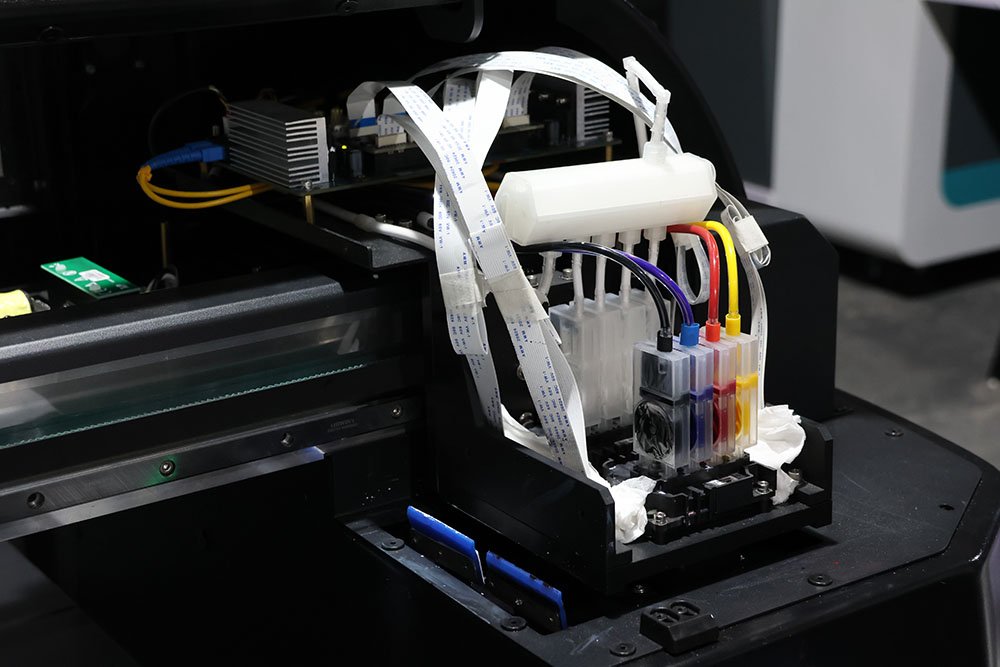
Summary: Maintaining a functional inkjet printhead cleaning system is crucial for print quality and printhead longevity. Most common faults—such as clogged nozzles, worn seals, blocked suction tubes, or motor/control failures—can be resolved through systematic inspection, proper maintenance, and timely replacement of key components like the cleaning stack, hood, suction device, and ink pump.
In this article, we explain how the printhead cleaning system works, identify common faults, provide step-by-step detection methods, and offer practical solutions to ensure your printer runs smoothly and efficiently.
1. How the Printhead Cleaning System Works
Normally, when the printer is powered on, the printhead moves along the carriage to the cleaning unit and executes the automatic cleaning program. During cleaning:
- The suction mechanism draws residual ink from the nozzles.
- After cleaning, the printhead is sealed by rubber gaskets on the printhead mount to keep the nozzles moist and prevent drying.
If a fault occurs, the printhead may fail to clean properly, resulting in poor ink flow or nozzle blockages.
2. Common Faults and Detection Methods
2.1 Component Wear or Damage
Sealing Rubber Aging or Damage
- Symptom: The printhead cannot stay moist; cleaning is ineffective.
- Solution: Inspect and replace damaged rubber parts.
Hood (Cover) Deformation or Misalignment
- Symptom: Printhead not fully sealed, nozzles dry out.
- Solution: Minor deformations can be adjusted; severe damage or contamination requires replacement.
Suction Device or Ink Tube Blockage
- Symptom: Ink cannot be drawn; cleaning fails.
- Solution: Inspect tubing and sponge; clean or replace as needed.
2.2 Drive Motors and Control Issues
Cloth Feed Motor Malfunction
- Role: Drives the cleaning unit.
- Solution: Inspect and repair the motor; replace if necessary.
Carriage Motor or Drive Malfunction
- Role: Moves the printhead to the cleaning unit.
- Symptom: Carriage fails to reach the cleaning position.
- Solution: Inspect carriage motor and drive circuits; repair or replace as needed.
Main Control Board Fault
- Role: Controls cleaning sequences.
- Solution: Determine whether to repair or replace based on diagnostics.
2.3 Printhead Cleaning and Sealing Mechanism (“Wipe, Scrape, Cover, Suction”)
This mechanism is located at the printhead’s initial position and performs four key functions:
Wipe & Scrape—Cleans residual ink from the printhead.
- Faults are rare, usually limited to worn rubber blades, which can be replaced.
Cover (Hood)—Seals the printhead when idle to maintain nozzle moisture.
- Common faults: deformation or restricted movement.
- Solution: Adjust or replace the hood.
Suction Device – Removes semi-dried ink and air from the printhead and ink system.
- Common faults: broken or disconnected suction tubes, blocked suction tips.
- Solution: Inspect tubing and sponge; clean or replace as necessary.
3. Fault Diagnosis Procedure
1) Observe the cleaning process to identify whether the problem is suction failure, incomplete cleaning, or sealing issues.
2) Inspect the cleaning stack, hood, and rubber seals for aging or damage.
3) Check suction tubes, sponge, and filters for blockages.
4) Inspect the cloth feed motor, carriage motor, and drive circuits.
5) Test the main control board signals to ensure proper cleaning sequence execution.
By systematically following these steps, faults can be quickly located, minimizing downtime.
4. Maintenance Recommendations
- Regularly inspect the cleaning stack, hood, and sealing components.
- Clean suction tubes and sponges periodically to ensure unobstructed ink flow.
- Check motors and control circuits routinely.
- Use cleaning solutions compatible with the ink type.
- Maintain stable temperature and humidity to prevent nozzle drying.
Proper maintenance significantly extends the life of the printhead and cleaning system.
5. Summary
Printhead cleaning system failures are often caused by worn seals, blocked suction paths, motor malfunctions, or control board issues. With regular inspection, proper maintenance, and timely replacement of key components, most problems can be resolved quickly, preventing printhead damage and production delays.
If you encounter difficulties in maintaining your printhead cleaning system or selecting replacement printer parts, contact our technical team. We provide comprehensive cleaning system diagnostics, parts replacement, and optimization solutions to help your digital textile printer operate reliably and efficiently.


