
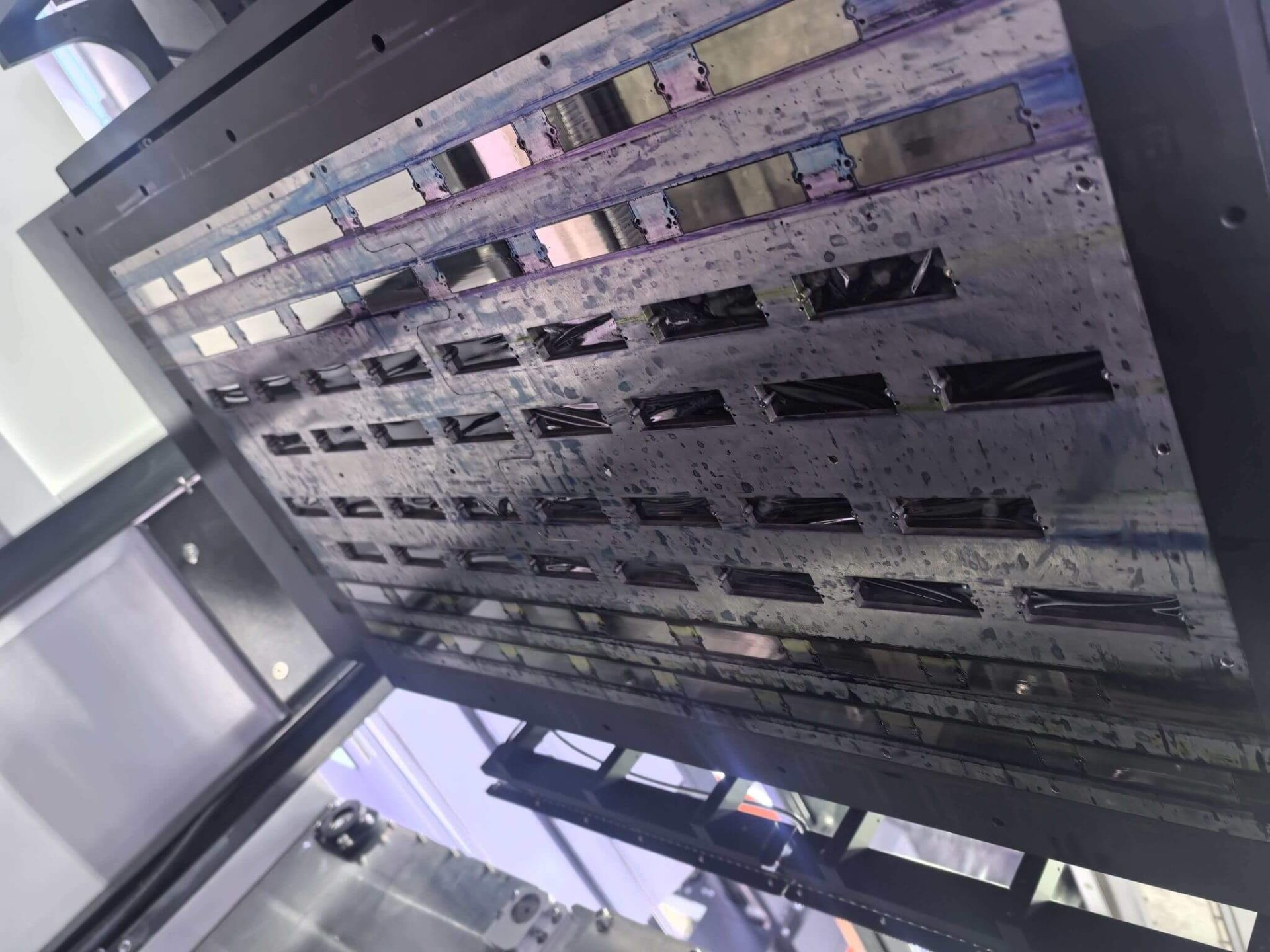
Ink buildup on inkjet printheads is a common yet often misunderstood issue in industrial and wide-format printing. While clogged nozzles are frequently blamed on ink quality or insufficient cleaning, three critical factors are often overlooked: printhead waveform settings, ambient temperature, and environmental humidity.
These elements directly and indirectly affect droplet formation, ink stability, and nozzle cleanliness. When mismanaged, they accelerate ink residue accumulation, nozzle blockage, and print quality degradation. This article provides a systematic explanation of how these factors contribute to ink buildup—and how to address them effectively.
1. Printhead Waveform Issues: A Hidden Cause of Ink Residue
1.1 What Is a Printhead Waveform?
A printhead waveform refers to the electrical driving signal that controls ink ejection. It defines voltage amplitude, pulse duration, and firing frequency—parameters that directly determine droplet speed, volume, and separation.
When waveform parameters deviate from optimal values, ink may not fully detach from the nozzle, leading to gradual accumulation around the nozzle plate.
1.2 How Abnormal Waveforms Cause Ink Buildup
Low Driving Voltage
If the peak voltage is insufficient, ink droplets lack the kinetic energy needed for clean separation. Partial droplets remain on the nozzle edge, dry rapidly, and form hardened ink deposits that attract further residue.
Excessive Pulse Duration
An overextended pulse width causes the ink to overexpand inside the nozzle chamber. After firing, surplus ink adheres to internal walls, creating a “coating effect” that thickens over time and restricts ink flow.
Unstable Firing Frequency
Fluctuating frequency disrupts jetting rhythm. Some nozzles may underfire (allowing ink stagnation), while others overfire, causing splashback and ink mist that settles on the printhead surface.
1.3 Corrective Actions for Waveform-Related Buildup
Waveform calibration requires professional tools and should generally be handled by trained technicians.
Recommended Process:
- Measure existing waveform parameters using diagnostic software or waveform analyzers.
- Compare values against manufacturer specifications.
- Adjust parameters incrementally (e.g., voltage changes in small steps).
- Perform nozzle tests after each adjustment to verify stability.
⚠️ If engineer-level access is unavailable, waveform recalibration should be performed by authorized service personnel to avoid permanent printhead damage.
2. Temperature Effects on Ink Behavior and Printhead Condition
Temperature influences ink viscosity, evaporation rate, and even printhead materials. Both excessive heat and cold environments can lead to ink accumulation—but through very different mechanisms.
2.1 High-Temperature Environments (Above 30°C)
Reduced Ink Viscosity
As the temperature rises, the ink becomes thinner. Low viscosity increases the likelihood of ink misting, where droplets break apart mid-air and settle back onto the nozzle plate.
Thermal Expansion of Nozzles
Plastic and composite nozzle materials expand slightly under heat. Even microscopic changes in nozzle geometry reduce droplet focus, increasing the chance of ink adhering to nozzle edges.
Surface Coating Degradation
On ceramic printheads, prolonged heat accelerates aging of protective coatings, reducing ink repellency and allowing residue to accumulate more easily.
2.2 Low-Temperature Environments (Below 10°C)
Cold temperatures significantly raise ink viscosity, slowing flow inside the nozzle. This often causes tailing or filament formation, leaving ink strands partially attached after firing.
Increased Ink Thickness
Mechanical Movement Issues
Low temperatures can thicken lubricants on rails and carriages, causing slight printhead hesitation. When firing and motion lose synchronization, ink may pool or settle unevenly.
2.3 Temperature Control Strategies
For Hot Conditions
- Maintain room temperature between 20–25°C.
- Improve airflow without directing fans at the printhead.
- Use heat-resistant or high-viscosity ink formulations if necessary.
For Cold Conditions
- Allow printers to warm up before operation.
- Use inks designed for low-temperature stability.
- Ensure ink cartridges are well mixed before printing.
3. Humidity: The Silent Accelerator of Ink Accumulation
Humidity levels directly affect ink evaporation, static electricity, and microbial growth—each of which can contribute to nozzle contamination.
3.1 Low Humidity (Below 40%)
Rapid Ink Drying
Dry air accelerates moisture loss at the nozzle, causing ink to thicken or solidify before it can be flushed away by subsequent firing.
Static Electricity and Dust Attraction
Low humidity increases static charge on plastic surfaces. Dust particles cling to ink residue at the nozzle, forming dense, stubborn deposits that interfere with jetting accuracy.
3.2 High Humidity (Above 70%)
Ink Dilution and Absorption
Excess moisture may be absorbed into ink systems, reducing ink concentration and surface tension. Diluted ink is more prone to seepage around nozzle edges.
Microbial Contamination
Warm, humid environments encourage bacterial growth in water-based inks. Gel-like biofilms can form inside nozzles, causing severe blockages.
Electrical Risks
High humidity may also affect printhead cables and connectors, leading to unstable firing signals and ink stagnation.
3.3 Effective Humidity Management
If the air is too dry
- Use a humidifier to maintain 50–60% RH.
- Periodically clean nozzle surfaces with lint-free, slightly damp wipes.
If the air is too humid
- Deploy dehumidifiers or moisture absorbers.
- Store unused ink cartridges in sealed packaging.
- Cover printheads during extended downtime, allowing minimal ventilation.
4. Combined Environmental and Electrical Effects: Real-World Scenarios
Ink buildup rarely results from a single factor. In practice, waveform errors, temperature, and humidity often interact.
Scenario A: High Heat + Dry Air + Low Voltage
Ink evaporates rapidly while droplet energy is insufficient. Residue forms within days.
Solution: Normalize temperature and humidity, recalibrate waveform voltage, and increase nozzle checks.
Scenario B: Cold Weather + High Humidity + Frequency Instability
Thickened, moisture-affected ink combined with erratic firing leads to stagnation and contamination.
Solution: Preheat equipment, control humidity, stabilize waveform frequency, and use temperature-tolerant ink.
Conclusion
Ink buildup on printheads is not merely a maintenance issue—it is the result of electrical, environmental, and material interactions. By paying close attention to waveform stability, temperature control, and humidity management, operators can significantly extend printhead lifespan, reduce downtime, and maintain consistent print quality.
Preventive control is always more effective—and less costly—than repeated cleaning or premature printhead replacement.


