In this post, a common question we want to try and address is “Which inkjet print head should I use?”. Why is this question so common? Most likely, it’s a combination of the sheer number of options available and the lack of resources that help explain the differences between them. While we can’t do anything about the number of choices, we will explain some key factors to consider to help narrow the field. We will focus on design, not vendors. This means we will discuss generic considerations such as speed, resolution, frequency, and ink type.
Target Size
The first thing you should consider is what you want your print to look like. Just like the ink you wish to think about, this is first and foremost set by the application. If you print a sell-by date on a carton of milk, this has a different desired appearance than if you print a billboard or print a layer of topography on a piece of composite material to make it look like wood. While there are many aspects to the appearance of a print, an important factor in deciding what printhead to use is resolution.
Resolution is expressed in DPI or dots per inch. The higher the resolution, the more ink droplets are printed per inch, and the droplets are also smaller. Determining the resolution required for an application is based on many factors. Take viewing distance, for example. Beyond a certain distance, viewers cannot tell the difference between a 72dpi image and a 1200dpi image, so printing at a higher resolution requires unnecessary time, money, and complexity. The substrate also plays a role in determining what the resolution is. The difference between 100 dpi and 1000 dpi is more noticeable on photo paper than on carpet.
Once you have determined the required resolution based on testing, industry comparisons, or other methods, that means you can calculate the dot size. If there are 360
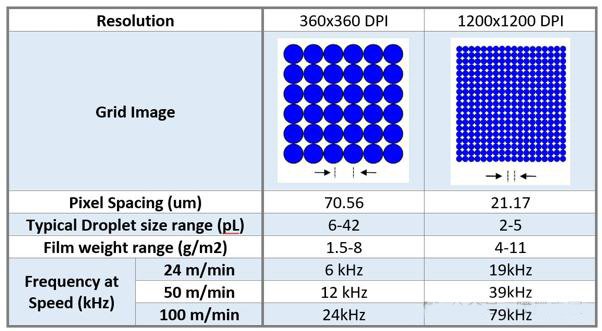
dots per inch, which means each dot is 1/360 of an inch (70.56 microns) in diameter. Once you know the dot size you need, the next step is to determine the volume of the ink drop that will produce that size dot. Most printhead manufacturers scale the drop size to the intended resolution and make assumptions about the amount of ink spread that will be likely so that the substrate is covered. The assumptions about the drop volume required for each resolution depend heavily on the amount of spread that is present, which is a property of the ink relative to the surface. This is easier to explain if we only consider 1, as shown in the table, which shows some key properties of inkjet print heads printed at two popular resolutions used in label printing 10 years ago and now.
From here, you've estimated the drop volume you'll need to get the print you want. Fortunately, printhead manufacturers specify the typical drop volume a printhead will produce, so this should help narrow your choices from the outset.
Print Speed of Inkjet Print Head
The next step is to determine how fast the various printheads you are considering can produce an image of that resolution, and decide if that is acceptable for your application. The way to do this is by comparing the frequency, or drops per second, that the printhead can produce, which is a specification provided by the manufacturer. For inkjet printheads, this is usually on the order of kilohertz or thousands of drops per second. By multiplying the number of drops per inch required (resolution) by the number of drops per second that the printhead can eject (frequency), you can calculate the maximum speed at which you can move the substrate under the printhead. In the figure above, we have calculated some print frequencies as a function of speed. Looking at these values, you can see that printing at 1200DPI means you need to eject drops 2-3 times faster. This limits the printheads you can use to those that meet the higher resolution and frequency specifications, or you must reduce the speed at which you can move the substrate.
Be careful though. To improve print quality by balancing individual dot visibility and coverage capabilities, printhead manufacturers introduced grayscale printheads. These printheads can produce multiple drop volumes based on the waveform applied to them. It's a fantastic invention, but it's important to remember that different drop sizes take different times to trigger, as shown below.
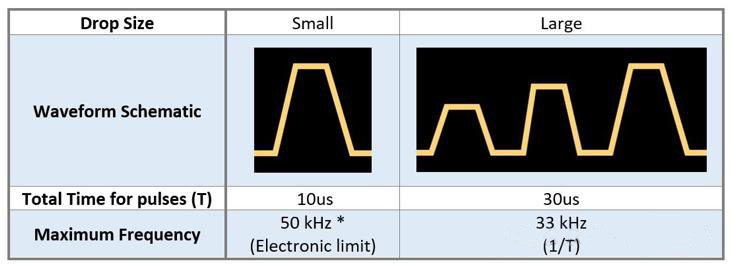
Why is this important? In many cases, the maximum discharge frequency documented in the inket print head datasheet is for a single pulse in binary mode, while the maximum fluid delivery specification documents what can be achieved in grayscale (multi-pulse). The maximum discharge frequency at maximum fluid delivery is usually lower and cannot be delivered at the higher frequency as in binary mode.
With this in mind, once you have determined the required print speed and frequency, you should be able to narrow down the printheads to choose from.
What to Do if the Print Head You Need Doesn't Exist
Let's say you decide you need 1200 dpi resolution and want to print at 10 m/s, so you calculate you need to print at 472 kHz. You search the market and find that there are no inkjet print heads that can do the job. There are still some techniques you can use to do what you need without inventing your printhead.
The first technique is that you are not limited to using a single inkjet print head. By placing two printheads one after the other in the printing process, you can double the throughput. In this case, you can have each printhead print at 600 dpi, 472 kHz, or you can have each printhead print at 1200 dpi, 236 kHz. By stacking multiple rows of printheads together, you can reduce the individual throughput required of each printhead to an achievable level.
Another technique that can work in your favor is the concept of "surface resolution". The basic idea is that a grayscale inkjet print (using varying droplet sizes) is visually equivalent to a higher-resolution print composed of uniform droplets. You can reduce the resolution requirement without any loss to the viewer. If you are more interested in this technology, check it out.
The Type of Ink You Are Using
The last thing to check is whether the printhead will work with the type of ink you want. Inkjet print head manufacturers always recommend the suitability of the ink platform on their datasheets (such as UV, solvent, or water-based). However, be careful about making assumptions. Not every type of ink is the same!
If you are a printer or converter getting new inks, ask the ink manufacturer what they do to test suitability. Usually "approved" or "certified" inks go through at least an accelerated testing process.
"If you are an ink supplier, it is a wise approach to get a Material Compatibility Kit (MCK) for a given head; just in case someone asks you for the data! Alternatively, you can pay the manufacturer to do this for you. Remember that if the ink attacks the head material, it is usually irreversible, so don't forget to put it on your checklist. If you are an ink supplier, it is a wise approach to get a Material Compatibility Kit (MCK) for a given printhead; just in case you are asked for the data! Alternatively, you can pay the manufacturer to do this for you. Remember that if the ink attacks the head material, it is usually irreversible, so don't forget to put it on your checklist."
Freedom to develop
It is worth noting that printhead manufacturers are not all exactly the same in terms of what they will allow you to do when using their printheads. The degree of openness in developing printheads varies from manufacturer to manufacturer. For example, some manufacturers allow you to modify the waveform applied to the printhead so that you can optimize the waveform to better suit your ink. Some manufacturers do not, and you must develop your ink based on the waveform. Some manufacturers have an open printhead architecture that allows you to use the inkjet print head outside of the manufacturer's printers, such as in a lab. If you want to be able to use the printhead on certain brand-specific devices, then you can only use printheads that allow you to do so. This freedom to develop outside of the manufacturer's printers and default settings is not useful for every type of inkjet development, but it can be very useful for some and worth considering.
Conclusion
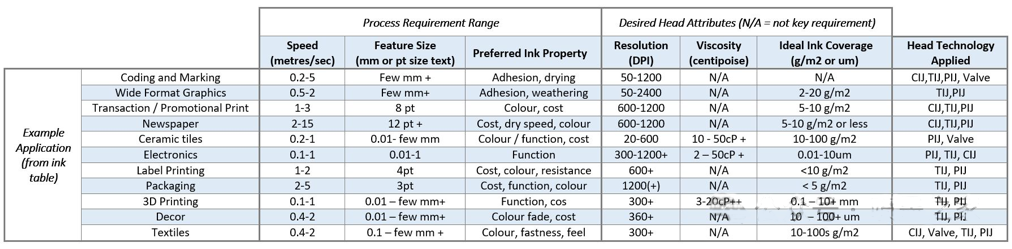
At this point, you should consider the resolution and speed you want to print to select an inkjet print head. This will guide your decision to choose a jetting technology category that meets those specifications: drop-on-demand (DOD), continuous inkjet (CIJ), or another printhead design. From there, you can dig deeper into the capabilities of each manufacturer and printhead model to find the one that matches your needs and inks. While there are no hard and fast rules, it may be helpful to look at the different needs of some existing application spaces. In the table below, we provide a non-exhaustive summary of potential considerations that may affect how your application is determined.