
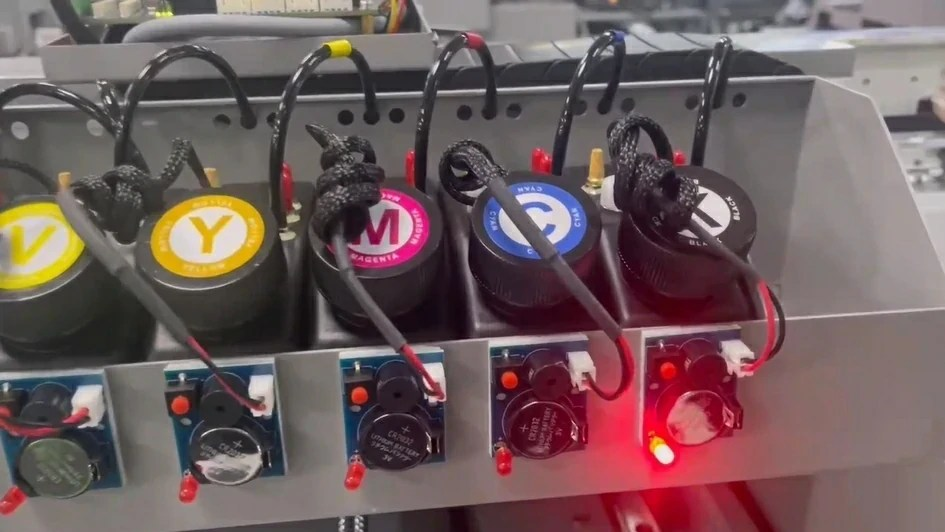
In inkjet printers such as UV printers and wide-format digital printing systems, the negative-pressure ink supply system is a fundamental factor in print stability and printhead protection. Although it does not directly participate in ink jetting, improper negative pressure control can lead to air leakage, printhead ink flooding, ink back-suction, frequent cleaning cycles, and even permanent printhead damage.
Most print quality issues and ink system failures can ultimately be traced back to negative pressure imbalance, air leakage, or inadequate maintenance. A structured diagnostic approach combined with standardized printer parts replacement is essential for ensuring long-term machine reliability and extending the lifespan of high-value components such as printheads.
1. Air Leakage in the Negative Pressure System
Fault Symptoms
If the negative pressure pump operates repeatedly or cycles frequently, it usually indicates an air leak in the ink or air circuit. The system is unable to maintain stable negative pressure due to loss of air tightness.
Diagnostic Method
The first step is to determine whether the leakage occurs in the carriage-side ink system or in the negative pressure unit inside the electrical cabinet, or both.
The recommended method is to clamp the main air line and observe the pump behavior:
- If the pump stops cycling, the leakage is likely located in the carriage-side ink system.
- If the pump continues to cycle, the leak is likely within the negative pressure device or its internal tubing.
- If both conditions occur intermittently, both sections should be inspected.
Once the area is identified, all air tubes, connectors, seals, and related components should be checked carefully. Damaged or aged parts must be replaced to restore proper air tightness.
2. Printhead Ink Flooding (Ink Overflow)
Possible Causes
Printhead ink flooding is usually caused by abnormal negative pressure control, including:
- Insufficient negative pressure
- Deviation between displayed and actual negative pressure values
- Air leakage in the sub-ink tank valve or related ink/air paths
Corrective Measures
If negative pressure is too low, it should be adjusted upward gradually while monitoring the printhead condition.
If the pressure display is suspected to be inaccurate, disconnect the pressure gauge air tube and check whether the display returns to zero. If not, the gauge should be recalibrated or replaced.
If the issue is caused by leakage in the sub-ink tank valve assembly, inspect the valve core, air and ink connectors, cleaning liquid caps, and ink tubes for cracks or aging, and replace defective components accordingly.
3. Ink Back-Suction (Ink Backflow)
Fault Analysis Based on Occurrence Mode
Ink back-suction should be analyzed based on how and when it occurs:
- Ink backflow occurs while the carriage is stationary after a period of time, affecting a specific color
This is usually related to control board issues, such as the ink supply board or main board.
- Back-suction caused by excessive positive pressure duration
Overlong positive pressure breaks the negative pressure balance. Shortening the positive pressure time can resolve the issue.
- Backflow caused by incorrect liquid level sensor wiring
Incorrect wiring leads to false level detection. Correcting the wiring resolves the problem.
- Back-suction during printing
This is most commonly caused by air leakage. The entire air circuit should be inspected, and air tightness reinforced.
Handling Procedure After Back-Suction Occurs
When ink back-suction has already occurred, the following steps are recommended:
First, power off the printer and move the carriage to the left maintenance position.
Second, drain the waste ink tank to prevent overflow during maintenance.
Third, release most of the ink from the affected sub-ink tank to lower the ink level.
Finally, replace the ink inlet air tube to eliminate residual risk of repeated backflow.
Technical Support and Maintenance Solution Integration
In practical applications, solving negative-pressure ink system issues requires not only correct operating procedures but also stable, well-matched components and regular maintenance. As a printer accessories solution manufacturer and supplier, we support both OEM printer manufacturers and end users with reliable negative-pressure ink system components, including sub-ink tanks, negative-pressure valve assemblies, air and ink tubing, filters, and printhead maintenance consumables.
Drawing on extensive machine-level integration experience and real-world field feedback, we also provide maintenance kit solutions that group together high-wear components in the negative-pressure and maintenance systems. These kits help OEMs standardize machine configurations and after-sales programs while allowing end users to carry out preventive maintenance on a scheduled basis. By replacing consumable parts proactively, negative-pressure-related failures and printhead risks can be significantly reduced, helping extend the service life of both printheads and complete printer systems.
All components and maintenance solutions can be matched or customized to suit different printer structures, ink systems, and application requirements.


