Changing to a different ink brand but still experiencing ink starvation, missing nozzles, color inconsistency, or frequent printhead clogging?
Many printing businesses assume that poor ink quality is the main reason behind printhead problems. However, ink is only one part of the entire printing system.
In industrial inkjet printing, printhead performance depends on several interconnected factors, including the ink supply system, printer settings, maintenance practices, operating environment, and ink compatibility.
Even high-quality ink cannot deliver consistent printing results if the ink delivery system is unstable or the printhead is improperly maintained.
This guide explores five often-overlooked causes of printhead clogging and explains how proper maintenance and printhead cleaning solutions can help reduce downtime and protect valuable printheads.
Part 1. 5 Common Reasons Why Your Printhead Keeps Clogging
1. Ink Supply System Problems: The Ink Delivery Path Is Unstable
Common symptoms:
- Frequent ink starvation during printing
- Faded colors or inconsistent color density
- Missing lines or white streaks in printed images
- Intermittent nozzle performance
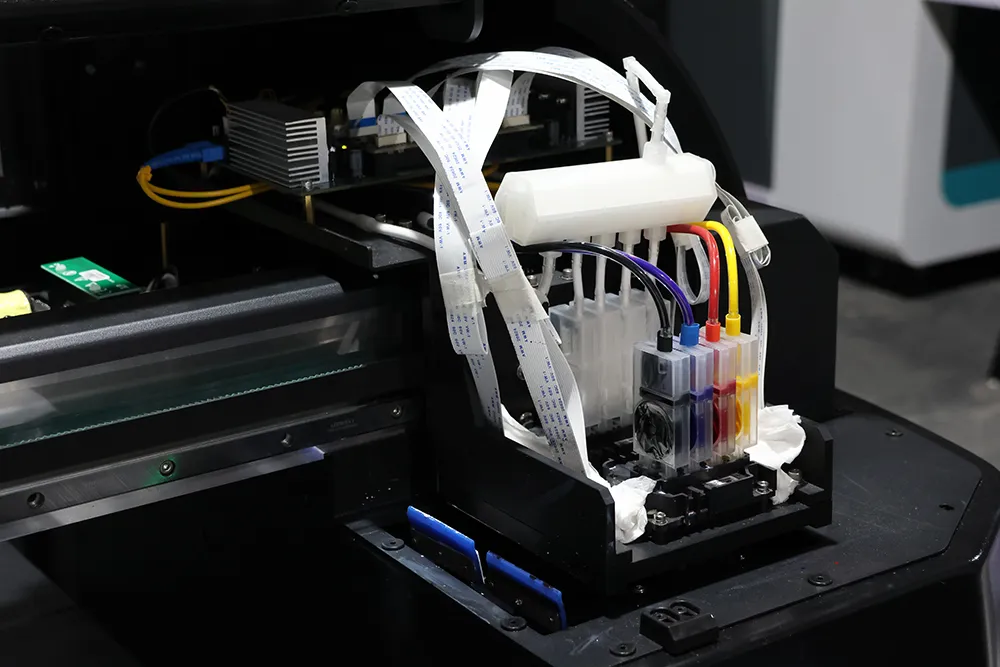
Sometimes, the printhead itself is not the problem. The real issue lies in the ink delivery system.
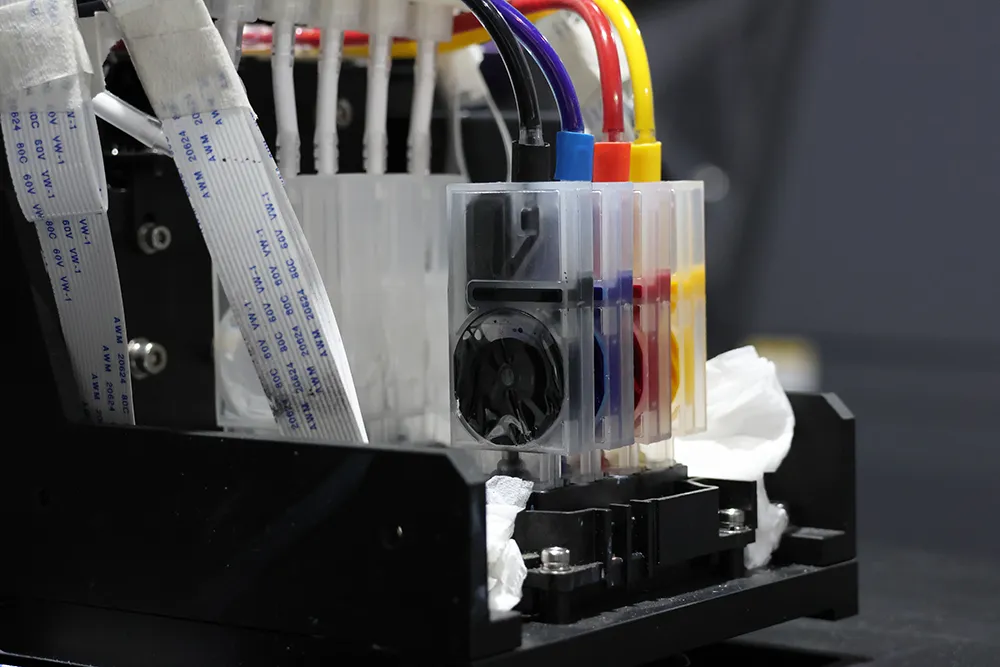
Air leaks, unstable negative pressure, incorrect ink levels, clogged filters, or aging dampers can prevent ink from reaching the printhead consistently.
For example, a damaged damper may fail to maintain stable ink pressure, while a partially blocked filter can restrict ink flow. Both situations can lead to nozzle starvation and interrupted printing.
What should you check?
- Inspect ink tubes, connectors, and fittings for air leaks.
- Check ink filters and dampers for contamination or restricted flow.
- Verify ink tank levels and negative pressure settings.
- Check pumps and other ink delivery components for abnormal operation.
JOHOPE Maintenance Tip: Inspect the ink supply system regularly, especially after replacing consumables or performing maintenance. Recheck negative pressure according to the printer manufacturer's specifications after servicing the ink path.
2. Incorrect Printer Settings: Carriage Height and Drying Temperature Matter
Printer configuration has a direct impact on print quality and ink performance.
Two commonly overlooked factors are printhead carriage height and drying temperature.
Printhead carriage height
If the printhead is positioned too high above the media, ink droplets may become more susceptible to deflection, resulting in blurred edges, inaccurate details, or ink misting.
If the carriage is too low, the printhead may scrape against the media, potentially damaging the nozzle plate.
The correct height should provide sufficient clearance while maintaining stable droplet placement.
Drying temperature
Incorrect drying temperature can also affect printing results.
- Excessive heat may accelerate solvent or water evaporation and affect ink behavior.
- Insufficient drying may cause ink spreading, smearing, or poor image stability.
Different ink chemistries and media materials require different drying conditions.
JOHOPE Maintenance Tip: Recheck carriage height, print speed, and drying parameters whenever you change ink types or media. Keep a record of successful printer configurations to make future adjustments easier.
3. Improper Printhead Maintenance: Small Maintenance Mistakes Can Cause Major Damage
A printhead is a precision component. Even when the ink supply system is working properly, poor maintenance can gradually affect nozzle performance.
Several common mistakes deserve attention.
Daily maintenance
Dried ink, dust, and other contaminants can accumulate around the printhead and capping station.
Regularly inspect and clean:
- Printhead surroundings and nozzle plate, following the manufacturer's cleaning procedure.
- Wiper blades and capping station.
- Ink residue around the maintenance unit.
Use appropriate lint-free materials and compatible cleaning solutions. Avoid applying excessive pressure to the nozzle plate.
Mixing incompatible inks
One of the most serious mistakes when changing ink brands is introducing incompatible ink formulations into the same ink path.
Differences in chemical composition may cause precipitation, gel formation, or other unwanted reactions, potentially restricting ink flow and clogging filters or nozzles.
Before switching ink brands or ink types, check compatibility and follow the recommended flushing procedure. Use a suitable cleaning solution to remove residual ink where necessary.
Improper long-term storage
When a printer will remain unused for an extended period, ink inside the printhead and ink delivery system may dry or become more difficult to circulate.
Follow the printer manufacturer's shutdown and storage instructions. Depending on the printhead and ink type, this may involve cleaning, capping, or using an appropriate storage or moisturizing fluid.
JOHOPE Maintenance Tip: Establish a regular maintenance SOP for operators. Record cleaning schedules, ink changes, consumable replacements, and long-term shutdown procedures.
4. Temperature and Humidity: Environmental Conditions Affect Printing Stability
The printing environment is another important factor that is frequently overlooked.
Temperature and humidity can influence ink viscosity, evaporation, static electricity, media behavior, and overall printing stability.
| Abnormal Environment | Possible Printing Problems | Main Reason |
|---|---|---|
| High temperature | Faster ink evaporation, dried ink residue, unstable printing | Increased evaporation rate |
| Low temperature | Ink starvation, unstable dark colors, poor ink flow | Increased ink viscosity |
| High humidity | Media deformation, moisture-related electrical risks | Moisture absorption |
| Low humidity | Increased ink misting and static-related defects | Static electricity and faster moisture evaporation |
As a general starting point, many printing environments operate around 20–28°C and 45–65% relative humidity. However, the ideal conditions depend on the ink formulation, printer specifications, and media.
JOHOPE Maintenance Tip: Install a reliable temperature and humidity meter in the production area. Use appropriate air conditioning, humidification, or dehumidification equipment to maintain stable working conditions.
5. Ink Quality: The Final Factor That Determines Printing Performance
After checking the ink supply system, printer settings, maintenance procedures, and operating environment, ink quality deserves closer attention.
Even if the printer is properly maintained, inconsistent ink formulations can still cause printing problems.
When evaluating ink quality, pay attention to:
- Chemical compatibility: Is the ink suitable for the printhead and ink delivery system?
- Viscosity and surface tension: Are the properties appropriate for stable droplet formation?
- Filtration: Is the ink adequately filtered to reduce particulate contamination?
- Batch consistency: Are viscosity, color, and other key properties stable between production batches?
- Long-term stability: Does the ink maintain reliable performance during continuous production?
A suitable ink should provide stable jetting performance, consistent color reproduction, and compatibility with the entire printing system.
However, no ink can compensate for damaged dampers, leaking tubes, incorrect negative pressure, or neglected printhead maintenance.
JOHOPE Maintenance Tip: Choose ink from reliable suppliers and verify compatibility with your printer and printhead. Evaluate ink performance under actual production conditions rather than relying on color appearance alone.
Part 2. How Can Printhead Cleaning Solutions Help Prevent Clogging?
When printhead clogging occurs, replacing the printhead is not always the first solution.
In many cases, dried ink residue, accumulated contaminants, or residual ink from an incompatible formulation may be contributing to the problem.
A suitable printhead cleaning solution can help dissolve or loosen ink residues, clean compatible ink-contact components, and support routine maintenance.
However, different ink technologies require different cleaning formulations. Using the wrong cleaning liquid may damage internal components or affect ink compatibility.
Choosing the Right Printhead Cleaning Solution for Your Application
JOHOPE provides printhead cleaning solutions for different inkjet printing applications, helping printing businesses maintain ink delivery systems and address ink-related maintenance problems.
| Printing Application | Relevant Cleaning Requirements |
|---|---|
| DTF / DTG printing | Cleaning solutions suitable for pigment-based textile inks, including white ink residue |
| Pigment printing | Cleaning solutions compatible with pigment ink formulations |
| Dye-based printing | Cleaning solutions designed for water-based dye inks |
| Sublimation printing | Cleaning solutions suitable for sublimation ink systems |
| Reactive and acid textile printing | Application-specific solutions for reactive and acid dye ink residues |
| UV printing | Cleaning solutions formulated for compatible UV ink systems |
| Solvent and mild-solvent printing | Cleaning solutions matched to the corresponding solvent ink chemistry |
Suggested image: Insert JOHOPE printhead cleaning solution product range image.
When Should You Use Printhead Cleaning Solutions?
1. During ink brand or ink type changes
Residual ink inside the tubes, filters, dampers, and other components may be incompatible with the new ink.
A suitable flushing solution can help remove remaining ink before introducing the replacement ink.
2. When dried ink residue affects printing
Ink residue around the nozzle plate, capping station, or other maintenance components may interfere with normal operation.
An appropriate cleaning solution can help soften and remove accumulated residue.
3. During routine maintenance
Regular cleaning of compatible ink-contact components helps reduce the accumulation of ink residue and other contaminants.
4. When addressing minor nozzle clogging
For certain cases of light clogging caused by dried or accumulated ink, a compatible cleaning solution may help restore ink flow.
Severe or permanent nozzle damage, however, cannot necessarily be repaired through cleaning.
Why Choose JOHOPE Printhead Cleaning Solutions?
JOHOPE offers cleaning solutions covering a range of industrial and wide-format inkjet printing applications.
Key advantages include:
- Multiple ink compatibility options: Solutions for UV, solvent, mild-solvent, pigment, dye, sublimation, and textile printing applications.
- Application-specific formulations: Different cleaning solutions are available for different ink chemistries.
- Multiple maintenance uses: Suitable products for routine cleaning, ink-path flushing, and addressing certain ink residue problems.
- Industrial printing applications: Designed to support maintenance requirements across different inkjet printing systems.
Important: Always confirm compatibility with the printhead model, ink chemistry, seals, tubing, and other ink-contact materials before use. Follow the recommended cleaning procedure and avoid mixing cleaning solutions with printing ink unless compatibility has been verified.
If you are looking for a suitable cleaning solution for your printing application, contact JOHOPE to discuss your requirements.
Conclusion: Don't Blame the Ink Before Checking the Entire Printing System
Frequent printhead clogging does not necessarily mean that your ink is defective.
Before replacing the printhead or switching ink brands again, check these five factors:
- Is the ink supply system delivering ink consistently?
- Are the printer settings properly calibrated?
- Is the printhead receiving appropriate daily maintenance?
- Are temperature and humidity within the recommended operating range?
- Is the ink compatible with the printhead and printing system?
A systematic approach to troubleshooting can help identify the actual cause, reduce unnecessary printhead replacements, and improve production efficiency.
At JOHOPE, we supply printheads, ink supply system components, maintenance consumables, and printhead cleaning solutions for wide-format and industrial inkjet printing applications.
Looking for compatible printhead cleaning solutions or ink supply components? Contact JOHOPE for product information and technical assistance.
Frequently Asked Questions (FAQ)
1. Why does my printhead keep clogging even after changing the ink?
Printhead clogging can result from several factors, including unstable ink supply, incorrect negative pressure, dried ink residue, incompatible ink formulations, and unsuitable operating conditions. Changing ink alone may not solve the problem if the underlying cause remains.
2. Can incompatible inks cause printhead clogging?
Yes. Mixing incompatible ink formulations may cause precipitation, gel formation, or other chemical reactions that restrict ink flow. Before changing ink brands or types, check compatibility and flush the ink delivery system with an appropriate cleaning solution when required.
3. How often should I clean my printhead?
The cleaning frequency depends on the printer model, ink type, production volume, and working environment. Daily inspection and routine maintenance of the nozzle area, wiper, and capping station are recommended. Follow the manufacturer's maintenance schedule rather than relying on an arbitrary cleaning frequency.
4. Can printhead cleaning solution unclog a blocked printhead?
A compatible cleaning solution may help remove dried ink residue and resolve certain minor clogs. However, it cannot guarantee recovery of severely blocked or physically damaged nozzles. Always use a cleaning solution suitable for the specific ink chemistry and printhead.
5. Can I use the same cleaning solution for UV, DTF, and solvent printers?
Not necessarily. UV, pigment-based DTF, and solvent inks have different chemical properties. Their cleaning requirements can also differ. Always select a cleaning solution formulated for the corresponding ink type and verify material compatibility before use.