
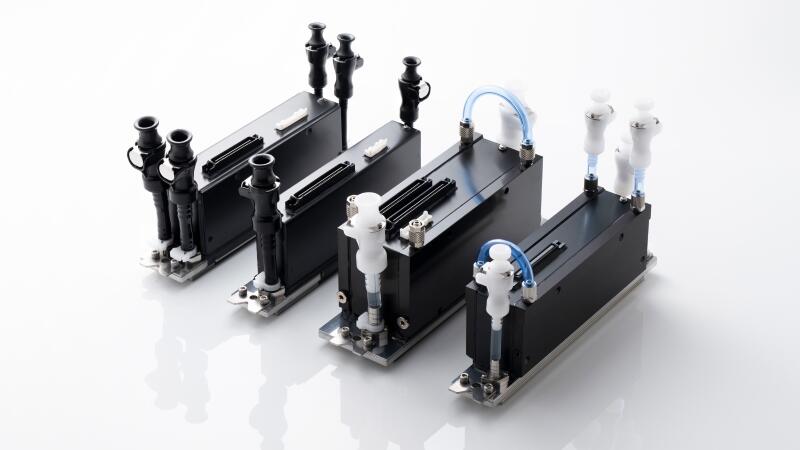
How to extend the service life of Kyocera print heads? As the core component of inkjet printing, the printhead occupies the main cost, so long-term stable use is crucial. Textile inkjet printing is promising because of its huge market. However, due to the particularity of the ink and various factors, before preparing the equipment, how to ensure that the printhead can be used for a long time seems to be the first thing we have to do.
Case: Machine with Kyocera Print Heads
An inkjet printer equipped with Kyocera printheads had been using domestic reactive ink for nearly two years. The printing test strip for the printhead is shown in Figure 1. As can be seen from Figure 1, there are currently 7 Kyocera printheads in use. The black color is in good condition, and only one nozzle does not produce ink. Several magenta nozzles do not produce ink, but more nozzles have oblique spraying. There are about 5 nozzles in the cyan color that do not spray ink, the yellow one is good, and no ink breakage or obvious slanting spray is found; four orange nozzles don't come out of ink; one sapphire blue nozzle doesn't come out of ink; the gray one is in good condition. The printhead used for black ink had been replaced midway, but the other printheads had not been replaced.
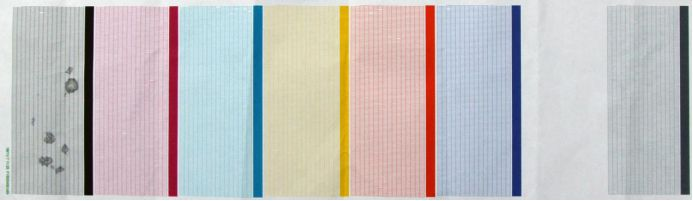
Note: At present, more than 40% of digital printing machines use Kyocera printheads. Kyocera printheads have many advantages, but they also have shortcomings in their application - the service life of the printheads is too short. Usually, it is good if it can be used for one year. More than a year and a half is relatively rare. So now equipment and even users are constantly summarizing how to extend the life of Kyocera printheads when using reactive ink. After looking at the test chart shown in Figure 1, it is hard to believe that this is a Kyocera printhead that has been using reactive ink for nearly two years.
Main Factors Affecting the Service Life of Kyocera Print Heads
1. PH value in the ink - ensuring the freshness of the ink
Some inks require that the PH value should not be higher than 5. If the PH value is too low, it will corrode the glue used for sealing the printhead. Once the ink enters the printhead, it will corrode the circuit board, causing a short circuit on the circuit board, generating heat, and even damaging the printhead.
For reactive inks, black and sapphire blue ink is easier to hydrolyze. Once the ink begins to hydrolyze, the pH value will slowly decrease, and the printhead usually has no resistance to inks with a pH value of <4.5 or below. To solve this problem, it is necessary to control the ink used to be no more than three months old from the factory.
2. Colloids in ink---control of colloidal impurities in ink
Another factor that shortens the service life of the printhead is that the ink contains more colloidal impurities. The last level of ink production is 0.1um level of precision. But for the nano-level colloids in the ink, people often ignore them and do not perform special filtration treatments. The colloid itself is charged and will grow slowly during storage. When it grows to a certain size, it will stick to the finer channels in the printhead. In severe cases, these channels and nozzles will be completely blocked.
Solutions to Extend the Service Life of Kyocera Print Heads
1. Control the freshness of the ink
The ideal ink used is to use it freshly made to ensure freshness. For inks that are particularly prone to hydrolysis, the quantity must be controlled in one production to ensure that the pH value of the ink is still within the agreed range when used.
2. Timely replace the filters on the ink supply path
It is recommended to replace all the filters on the equipment within 3-6 months. At the same time, the accuracy of the main filter currently used in many companies' equipment is 5 microns, while the accuracy used by this customer is 2 microns and 1 micron (as shown in Figure 2). The ability to intercept colloids is greatly improved, and of course, it will also cause the filter to be clogged in advance. The problem is that it is replaced in time and the life of the printhead is extended at a small cost. At the same time, this customer also has several old low-speed digital printing machines. The filters used follow the concept of advertising inkjet printing, which is not suitable for textile printing equipment with high precision requirements.
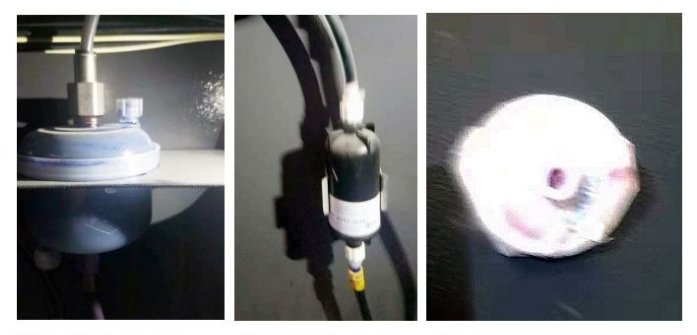
The time to replace the filter also depends on the actual printing volume: Generally speaking, the main filter in Figure 2 is usually used for no more than 6 months; for the filter in front of the secondary ink cartridge, the equipment manufacturer chose a 6um, 25mm diameter butterfly shaped filter, as shown in Figure 4. In actual application, it was found that the ink flow into the secondary ink cartridge was insufficient and an alarm occurred within 3 months. It became clogged and needed to be replaced.
3. Machines not in use for the time should be turned on frequently
in addition to the role of filters in capturing colloids, the other thing is to clean them up in time before the colloids grow to a certain large size. For equipment that does not start up very often, it is necessary to start up the ink press and clean it at least once every three days to ensure that the flow channels in the printhead are smooth.
4. Select the appropriate filter
To save costs, sometimes the wrong filter may be selected. Not only is the accuracy mark arbitrary and cannot be filtered, but it may also have the opposite effect of bringing in pollutants (poor interception efficiency, severe PP fiber shedding). Interception efficiency is the core of the filter. There are strict internal control standards. Products that do not meet the standards cannot be shipped.
(Source: TopPrint)


