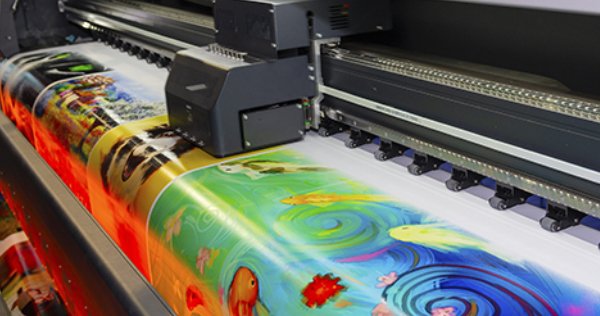
Do large format printers no longer need routine cleaning? Skipping maintenance on large-format printers can be very expensive.
For new large-format printers, manufacturers usually promise that their devices do not require much maintenance because most users are afraid to do extensive cleaning before or after printing. This is why most wide-format printers have automatic functions, such as nozzle cleaning.
However, further work is required to maintain the printer on a regular basis (usually once a month to once a week). The recommended time frame is usually given in the manual.
Especially for new printers, it is very important to adhere to these maintenance cycles and record them, because if the printer appears to have been seriously neglected, the warranty may be voided. Manufacturers and dealers who offer service contracts usually insist on regular maintenance as part of the service conditions.
General Maintenance of Large Format Printers
When it comes to maintaining large format printers, there are two parts to take care of: software and hardware.
Software Maintenance
Like any other electronic device, the firmware and control software of a wide format printer should always be kept up to date. This also applies to the computer on which the RIP is installed. An outdated operating system is a gateway to malicious code, making it easier for hackers to compromise the entire company's IT infrastructure.
Therefore, when downloading updates, you should always make sure to rely only on authorized sources. It may be tempting to download patches from enthusiastic users on insider tips websites. However, most users do not have the skills required to detect any flaws or backdoors in the software. In extreme cases, unauthorized software can cause hardware damage to the device.
Hardware maintenance
The basic steps for hardware maintenance for large format printers using any ink are very similar. It also does not matter whether you use manufacturer or third-party inks. The printhead and the area around the print table should be cleaned regularly (usually once a week). Although most manufacturers recommend not to touch the printhead.
In printers using solvent or eco-solvent inks, the printhead is usually protected by a cover. It should also be checked at least once a month and cleaned if necessary. For printers using UV-curing inks, it is important to check the lamp regularly. Dust, splatter, or paint mist can settle on the cover glass. They reduce the power of the lamp and thus the print quality. Paint residues on the glass are best removed with a blade or scraper.
The residual ink container, if any, should be checked regularly. For printing applications that require large amounts of ink, such as flag or textile printing, the drainage channels must also be checked regularly and cleaned if necessary.
For super-wide or high-performance large format printers, different maintenance intervals may apply. Compared to typical wide format printers (up to about 2.60 meters), they usually require more manual steps and sometimes daily maintenance.
Large-format printer maintenance tools
For large-format printers, most manufacturers provide a cleaning fluid. It is matched to the surface of the machine as well as the ink used. In addition, wipers or cotton swabs and lint-free wipes and cloths are essential for cleaning and maintaining wide-format printers.
Ink and cleaning fluids can be harmful to physical health. Therefore, users should always wear protective gloves and goggles when performing maintenance. Usually, the use of a mask is also recommended.
You should not eat or drink when cleaning a wide-format printer. Smoking is not only harmful to health, but it can also pose a considerable fire hazard during the cleaning process, as most solvent vapors are highly flammable.
Maintenance of large-format printers
If a wide-format printer requires unscheduled cleaning, this is usually indicated directly on its display. For scheduled maintenance, which is done weekly or monthly, it may be necessary to activate the cleaning mode manually to move the print carriage for better access or unlock machine parts that need to be opened or disassembled.
Afterward, the necessary steps are described in the printer manual. Once the cleaning is complete, you usually verify the process on the display so that the printer can be restored to working mode. For most wide-format printers, manufacturers and service technicians recommend not to try to replace print heads and lamps yourself. In addition, any electrical tampering should be strictly left to service technicians, as the risk of electric shock or burnt cables is considerable.
Maintenance intervals and cleaning cycles should also always be documented externally, for example in a maintenance manual next to the machine. This allows the user to prove the maintenance status of the printer, even in the unlikely event of replacing the motherboard or losing the online account.
Online Advice and Help
Some manufacturers, such as Roland DG, Mutoh or Epson, offer entire YouTube playlists with videos on the care and maintenance of widely used models. This is also very useful for old or second-hand printers whose manuals have been lost over the years.
On YouTube, you can also find more videos on various topics on the care and maintenance of wide and superwide printers. Keep in mind that the quality of the information can vary greatly, as the videos can be uploaded by experienced dealers, laymen or even some scammers trying to sell you unnecessary or low-quality goods.
Maintenance of Wide Format Printers is Sustainable
Even if it requires considerable effort, a well-maintained wide-format printer is worthwhile because the life cycle of the machine will be extended and the print quality is generally more consistent. This in turn saves costs, reduces waste, and helps improve profitability.
Every wide-format printer that lasts longer, even if it is a refurbished or second-hand device, helps save raw materials and greatly benefits the environment.