As UV printing continues to expand across advertising, packaging, customization, and industrial manufacturing, one component plays a decisive role in determining output quality, productivity, and long-term stability:
The printhead
Many buyers focus on price or brand when selecting a UV printer, but overlook the fundamental differences between printhead technologies. This often leads to poor print quality, frequent maintenance, or even costly downtime.
In this guide, we break down the three dominant UV printhead solutions:
- Ricoh Gen5 / Gen6
- Epson XP600 / i3200
- Konica 1024i / 512i
We’ll help you choose based on real business needs—not just specs.
1. Core Specifications Comparison
Ricoh Gen5 / Gen6: Industrial All-Round Performer
| Specification | Details |
|---|---|
| Drop Size | 7–21 pl (Gen6 down to 5 pl) |
| Resolution | 600 dpi |
| Nozzles | 1280 |
| Print Width | 54.1 mm |
| Grayscale | 6–8 levels |
| Materials | Wide compatibility (glass, metal, acrylic, composites) |
| Heating | Built-in (30–40°C optimal) |
| Lifespan | 3–5 years |
| Applications | Industrial printing, varnish, embossing, packaging |
Key Strength: Balanced performance across speed, precision, and material compatibility
Epson XP600 / i3200: High-Precision Specialist
| Specification | Details |
|---|---|
| Drop Size | 3.5–12 pl (i3200 supports 6.2 / 9.5 / 15.6 pl) |
| Resolution | Up to 1440 dpi |
| Nozzles | 3200 (i3200) |
| Print Width | 67.2 mm |
| Grayscale | 4 levels |
| Materials | Absorbent (paper, textile, transfer film) |
| Temperature | 25–30°C recommended |
| Lifespan | 1–2 years |
| Applications | Custom products, labels, textile printing |
Key Strength: Ultra-fine detail and image quality
Konica 1024i / 512i: High-Speed Production Engine
| Specification | Details |
|---|---|
| Drop Size | 14–42 pl |
| Resolution | 720 dpi |
| Nozzles | 1024 |
| Print Width | 50.8 mm |
| Grayscale | Limited |
| Materials | Non-absorbent (PVC, glass, wood) |
| Temperature | Wide tolerance |
| Lifespan | 2–3 years |
| Applications | Billboards, boards, flooring, large-format |
Key Strength: Maximum speed and throughput
2. Application-Based Selection: Match the Printhead to Your Business
Choosing a printhead is not about which is “better”—it’s about which fits your production model.
2.1 Material Compatibility: What Can You Print?
Ricoh Gen5 / Gen6
- Works on both rigid and flexible materials
- Ideal for mixed production environments
Epson XP600 / i3200
- Best for absorbent substrates
- May struggle on rigid/non-absorbent surfaces
Konica 1024i / 512i
- Optimized for rigid, non-absorbent materials
- Ideal for industrial boards and panels
Conclusion: Material type should be your first decision factor
2.2 Speed vs Precision: Define Your Market Position
| Printhead | Speed | Precision | Best For |
|---|---|---|---|
| Ricoh | Medium–High | High | Balanced production |
| Epson | Low–Medium | Ultra-high | Custom / detailed work |
| Konica | High | Medium–Low | Mass production |
Simple logic:
- Epson = detail-driven business
- Konica = volume-driven business
- Ricoh = balance between both
2.3 Cost Structure: Think Beyond Purchase Price
- Ricoh → Higher upfront, lower long-term cost
- Epson → Lower entry cost, higher maintenance frequency
- Konica → Medium investment, optimized for high output
The real cost is measured in cost per print over time, not the machine price
3. Three Critical Mistakes to Avoid
Mistake 1: “I can upgrade the printhead later.”
Reality: Nearly impossible
Printheads define the entire machine architecture:
- Control boards
- Ink delivery system
- Electrical interfaces
- Mechanical structure
Changing printheads = replacing the entire machine
Tip: Choose based on your 1–3 year business plan
Mistake 2: “Ink can be used across different printheads.”
Reality: One of the fastest ways to damage a printhead
Each printhead requires specific ink properties:
- Viscosity
- Surface tension
- Pigment dispersion
- Curing behavior
Using incompatible ink may cause:
- Clogging
- Jetting instability
- Color inconsistency
- Permanent damage
Tip: Always use tested or manufacturer-recommended ink
Mistake 3: “Faster speed means higher efficiency.”
Reality: Speed ≠ Profitability
Higher speed usually means:
- Larger droplets
- Lower detail quality
This can lead to:
- Customer dissatisfaction
- Reprints
- Limited high-end opportunities
True efficiency = Speed × Quality × Order Value
4. How to Choose the Right UV Printhead (Decision Guide)
After understanding the differences, the key question is no longer “Which printhead is better?”
It becomes: “Which printhead fits my business model?”
4.1 If You Focus on Customization & Small Orders
Choose Epson XP600 / i3200
This is the ideal option for businesses driven by detail, flexibility, and variety.
Why it works:
- Ultra-small droplets deliver sharp details and smooth gradients
- Lower initial investment reduces entry barriers
- Flexible configurations support diverse product types
Best suited for:
- Personalized gifts
- Custom packaging
- Labels and fine graphics
- Textile and transfer printing
Business logic: High value per piece, lower volume
4.2 If You Need Industrial Quality & Versatility
Choose Ricoh Gen5 / Gen6
This is the most balanced solution for companies that require consistent output across multiple applications.
Why it works:
- Strong grayscale control enables advanced UV effects (varnish, embossing)
- Wide material compatibility reduces production limitations
- Long lifespan supports continuous industrial operation
Best suited for:
- High-end packaging
- Decorative panels
- Industrial labeling
- Multi-material production
Business logic: Stable output + broader service capability
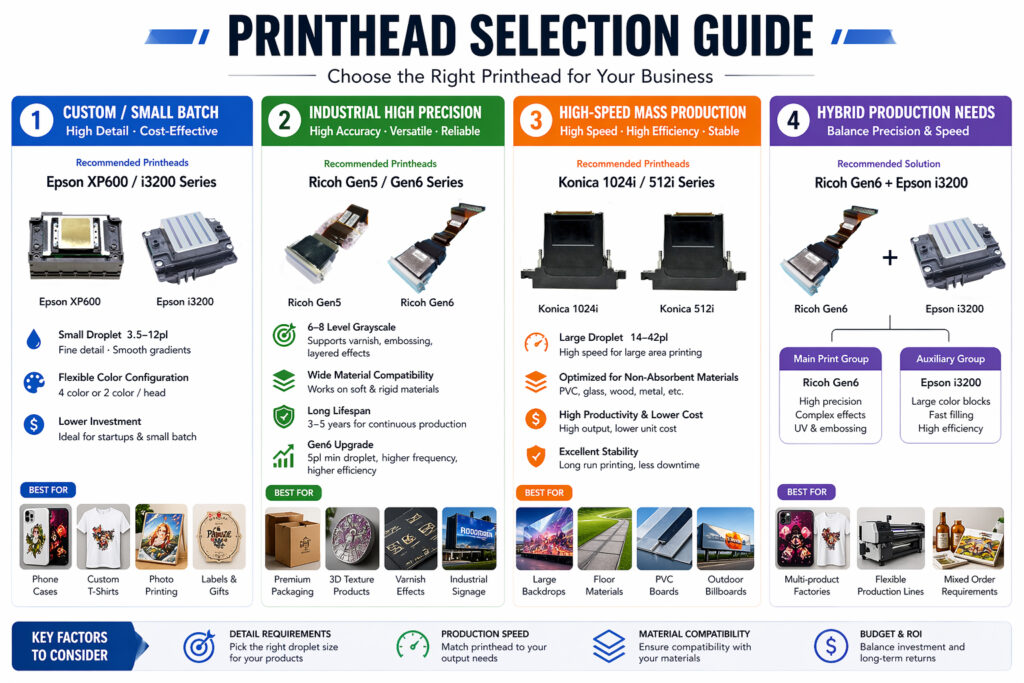
4.3 If You Run High-Volume Production
Choose Konica 1024i / 512i
Designed for businesses where speed and throughput are the top priorities.
Why it works:
- Large droplets allow fast ink coverage
- High firing frequency boosts productivity
- Optimized for rigid, non-absorbent materials
Best suited for:
- Billboards and signage
- PVC boards and panels
- Flooring and decorative materials
Business logic: High volume = lower cost per unit
4.4 Advanced Strategy: Hybrid Configuration
If your business covers multiple segments, a single printhead solution may limit your growth.
Consider a hybrid setup:
- Ricoh → handles high-quality, complex, high-margin jobs
- Epson → handles detailed, small-format, custom orders
Result:
- Better resource allocation
- Higher equipment utilization
- Ability to serve both premium and volume markets
Final Decision Framework
Before making a purchase of UV printhead, clarify these 5 key factors:
- Order type → Custom or mass production?
- Material type → Absorbent or rigid?
- Quality requirement → Fine detail or solid fills?
- Production scale → Low, medium, or high volume?
- Growth plan → Short-term savings or long-term stability?