UV flatbed printers are the core production equipment for many processing workshops, often required to operate continuously under long hours and heavy workloads. When unexpected ink supply issues appear during production—such as banding, missing nozzles, ink dropouts, or insufficient ink supply—operators often assume the cause is an aging ink pump, electrical failure, leaking tubes, or poor printhead condition.
However, behind many of these seemingly “stubborn problems” lies a component that is frequently overlooked yet extremely critical: the printer inkjet filter.
As the machine continues to run, filters constantly capture particles and impurities in the ink. Once these filters enter a “semi-clogged” state, various complex, random, and hard-to-reproduce failures begin to appear. Many users blame the pump or the printhead when, in reality, the root cause is simply that the filters haven’t been replaced for too long.
This article explains the function of ink filters, how semi-clogging affects ink delivery, how it increases the load on ink pumps, and how simple maintenance can prevent these hidden issues.

Ⅰ. Printer Inkjet Filter Functions
Ink filters play multiple protective roles throughout the ink path. They are unobtrusive but indispensable. Their main functions include:
1. Removing Contaminants from the Ink
- Filters effectively capture:
- Large solid impurities
- Pigment agglomerates formed inside the ink
- Debris from aging ink tubes
- Tiny particles introduced from the external environment
If these contaminants enter the printhead, they may cause nozzle clogging, damage to the nozzles, or even permanent failure of the printhead.
2. Maintaining a Stable Ink Flow
During long, high-speed printing, UV flatbed printers rely heavily on stable ink flow. Filters help balance minor pressure fluctuations inside the ink path, ensuring smooth ink delivery without sudden surges or flow interruptions.
3. Maintaining Pressure Balance in the Ink Circuit
Proper filter structure helps the system maintain a stable pressure environment:
- Preventing ink backflow
- Avoiding overpressure that may cause printhead leaking
- Reducing the risk of air entering the system
4. Multi-Stage Filtration for Complete Protection
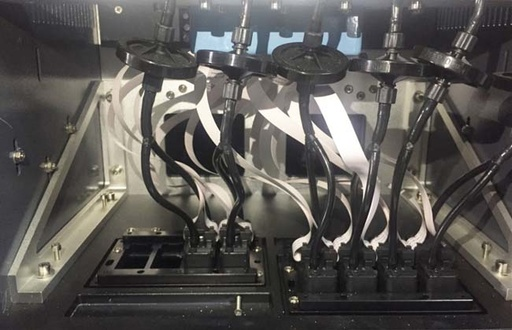
Most UV flatbed printers use a three-stage filtration system to handle different particle sizes:
(1) Main Filter / Large-Capacity Filter
Installed near the ink bottle or primary ink tank. It blocks large impurities and extends the life of downstream filters.
(2) Inline Filter / Subtank Filter
Responsible for medium-precision filtration to ensure a clean and stable ink supply to the subtank.
(3) Damper/Printhead-Side Filter
The finest filtration layer directly affects printhead pressure stability. Dampers also help absorb pressure fluctuations, maintaining continuous output during high-speed jetting.
When all three levels stay clean, the ink system performs optimally. When they begin accumulating impurities, various system issues soon follow.
Ⅱ. Semi-Clogged Filters: The Most Hidden and Common Source of Failures
Filters rarely clog completely in an instant—they enter a long semi-blocked phase, which is also the stage most likely to cause misdiagnosis.
Typical symptoms of semi-clogging include:
(1) Increased flow resistance
Partial blockage significantly impacts the entire ink delivery system.
(2) Ink pumps run under a higher load
Pumps work harder or more frequently to maintain normal pressure.
(3) Ink path becomes unstable
Pressure becomes inconsistent, resulting in ineffective cleaning cycles or intermittent ink supply.
(4) Random fluctuations in print quality
Nozzle performance becomes unpredictable, leading users to mistakenly think the printhead is permanently damaged.
These issues don’t present as an obvious “printer suddenly can’t print,” but rather as a gradually worsening, occasionally recovering condition—highly deceptive and difficult to diagnose.
Ⅲ. Why Inkjet Filter Problems Are Often Misdiagnosed as Pump Failures
Many print shops first suspect pump issues when ink delivery becomes unstable:
- “The pump seems weak.”
- “The pump can’t pull ink.”
- “Nozzles break after cleaning.”
- “Cleaning helps temporarily, but the problem comes back quickly.”
However, these symptoms strongly indicate semi-clogged filters, not a pump malfunction.
Key signs of printer inkjet filter clogging include:
Cleaning cycles take longer than usual
- Ink supply becomes inconsistent
- Air bubbles or intermittent flow appear in transparent ink tubes
- Nozzle check patterns fluctuate
- Repeated cleaning only restores the nozzles temporarily
If filters are not replaced, changing pumps or even printheads will not solve the problem.
Ⅳ. How Clogged Filters Damage Ink Pumps
Semi-blocked filters force the ink pump to operate under long-term high load, causing:
(1) Increased Mechanical Stress on the Pump
The pump must overcome greater resistance, accelerating wear on diaphragms, motors, or seals.
(2) Higher Pump Temperature
Extended runtime and higher negative pressure increase heat buildup, shortening pump lifespan.
(3) Pressure Instability Throughout the System
This may lead to tube leaks, joint failure, or insufficient ink supply.
Over time, clogged filters accelerate wear across the entire ink delivery system—not just the filter itself.
Ⅴ. Maintaining Your Printer Inkjet Filters
Compared to replacing printheads or pumps, printer inkjet filter replacement is inexpensive but provides significant benefits:
- Strong improvement in ink flow
- Reduced cleaning frequency
- More stable print quality
- Longer lifespan for pumps and ink tubes
Recommended Replacement Intervals (Industry Guidelines)
- Main filter: every 3–6 months
- Inline filter: every 2–3 months
- Damper: every 3–6 months (depending on printhead type)
For white ink, UV ink, high-temperature environments, or continuous high-volume production, shorten the cycle appropriately.
Ⅵ. Conclusion: Checking Filters First Solves 70% of Ink Supply Issues
In the daily maintenance of UV flatbed printers, printer inkjet filters are the most overlooked components, but also the most common source of ink delivery problems.
When you notice:
- Frequent missing nozzles
- Cleaning doesn’t improve the pattern
- The pump seems underpowered
- Air bubbles appear in the ink tubes
- Print quality fluctuates
Start with the simplest step: inspect and replace the ink filters.
This simple action often resolves the majority of ink supply failures, protects the printhead and pump, and prevents unnecessary repair costs.