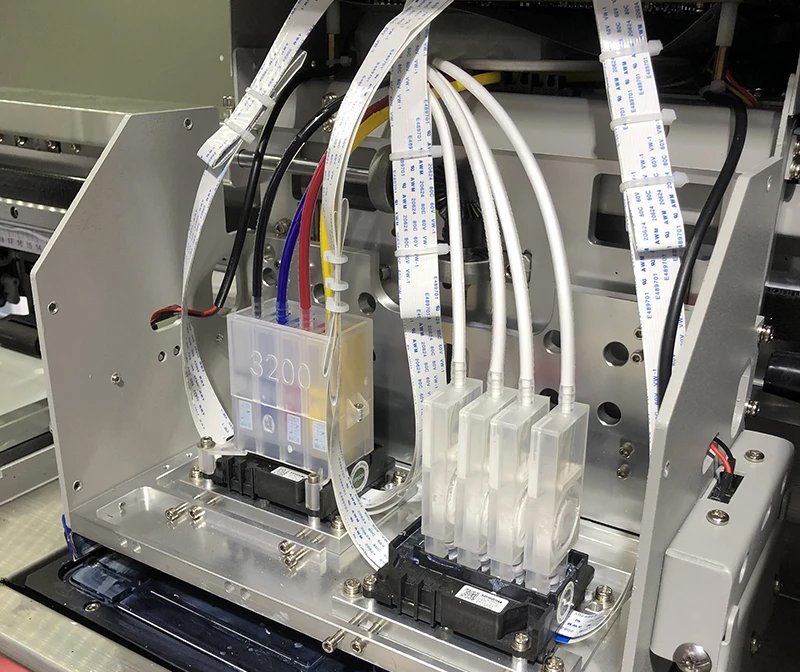
The ink damper is a key filtering and buffering component in an inkjet printer's ink system. Its primary function is to filter impurities and bubbles from the ink while also buffering fluctuations in ink supply pressure, ensuring stable ink delivery to the printhead. It is a crucial component for ensuring proper inkjet flow and image quality.
Functions of the Ink Damper
The ink damper, also known as the ink damper filter, is a filtering and buffering device located in the ink path before the printhead. Its core functions include:
Filtering impurities: Removing tiny particles and bubbles from the ink to prevent nozzle clogging.
Buffering ink supply pressure: Regulating pressure fluctuations in the upstream ink supply system to ensure a stable ink supply.
Anti-backflow design: Prevents ink from being sucked back into the auxiliary ink tank during printhead backflow, maintaining a clear, one-way ink path.
Supporting cleaning and ink extraction: Some ink dampers are equipped with an air vent or auxiliary ink extraction port for printhead maintenance.
Ink Damper Structural Features
High-density filter: Built-in 5μm-15μm microfiltration membrane for precise ink filtration;
Highly compatible design: Compatible with a variety of printheads, including the DX5/DX7, XP600, i3200, 4720, and Ricoh GH2220;
High valve control precision: Prevents backflow, ink dripping, and residual bubbles;
Compact structure and flexible installation: Supports single-head, dual-head, and quad-head printheads for wide adaptability.
Note: Different printhead models require different ink damper interfaces and pressure thresholds. It is recommended to use ink dampers specifically for each printhead model to avoid pattern stringing and ink breakage due to ink supply abnormalities.
Printer Damper Applications
1. Photo Printers/Inkjet Printers
Inks: Water-based, eco-solvent, and solvent-based inks
Applications: Indoor and outdoor advertising, light boxes, posters, adhesive backing, etc.
Purpose: Buffers ink supply pressure, prevents ink breakage, and filters impurities from solvent inks.
2. Dye-Sublimation Printers
Inks: Dye-Sublimation inks
Applications: Apparel fabrics, sportswear, home textiles, mouse pads, coasters, etc.
Purpose: Prevents impurities from clogging the micro-pressure printheads, enhancing image detail.
3. UV Flatbed/Roll-to-Roll Printers
Ink: UV-curable ink
Applications: Mobile phone cases, acrylic sheets, metal, leather, wood, glass, etc.
Purpose: Most use black UV-resistant ink dampers to prevent premature curing of the ink due to light exposure and protect the printhead and piping system.
4. Direct Textile Inkjet Printer (DTG)
Inks: Textile paint inks, water-based pigment inks
Applications: T-shirts, canvas bags, pillows, cotton and linen products
Purpose: Filters sediment from high-viscosity pigment inks, ensuring printhead life and color uniformity.
5. Industrial Inkjet Printer/High-Speed Inkjet Equipment
Inks: High-speed inks, industrial-specific inks
Applications: Packaging coding, label printing, product traceability code printing
Purpose: Stabilizes ink supply pressure and prevents air bubble interference during high-frequency, high-load printing.
Contact us today to get expert guidance and bulk pricing!
Printer Damper Maintenance
1. Daily Ink Supply Check
Observe the ink damper for smooth air intake and ink discharge. If you notice color printing errors or intermittent ink flow, prioritize checking the damper.
2. Regular Replacement
The filter inside the ink damper can become clogged with impurities after prolonged use. Regular replacement prevents ink flow obstruction and foreign matter from entering the printhead. Some users prefer to clean old ink dampers and continue using them, but this practice carries a high risk. Cleaning the filter will not restore its performance and may introduce impurities or air bubbles. It is recommended to replace it directly. Ink dampers are a common replacement component in daily printer use and maintenance. They are considered a consumable part and are relatively inexpensive, so frequent replacement is not costly. Regular replacement of the printer damper will effectively protect the printer.
3. Proper Storage to Avoid Drying and Aging
Uninstalled printer dampers should be kept sealed and protected from light and humidity to prevent aging and failure.
4. Choose a high-quality ink damper that matches your model.
Different printheads have different requirements for damper structure (such as filter density and chamber size). Using an incompatible model can significantly impact ink supply stability and potentially damage the printhead.
While inexpensive, ink dampers play a crucial role in the overall stability of the printer. Choosing the right ink damper, using it correctly, and replacing it promptly can ensure stable printhead output, reduce failure rates, and extend the printer's life.