The Epson I3200 printhead has become one of the most widely used industrial printheads in the digital printing industry. Thanks to Epson’s advanced PrecisionCore MicroTFP technology, the I3200 series delivers high-speed printing, excellent image quality, and long-term reliability across a wide range of printing applications.
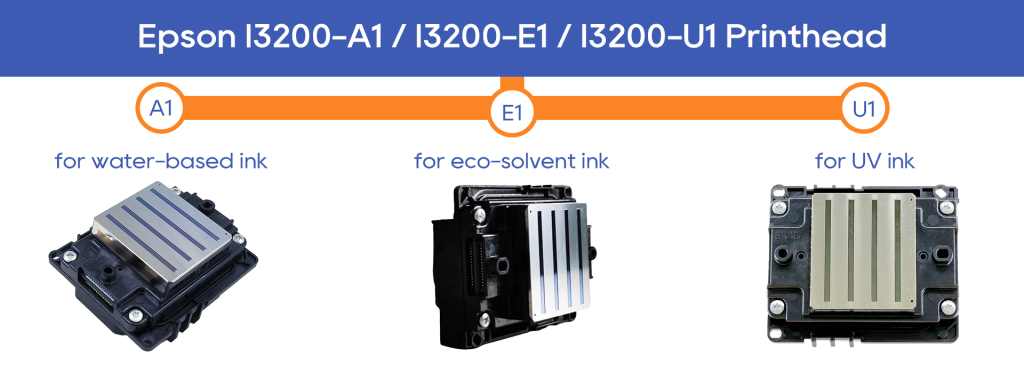
Available in three primary versions—I3200-A1, I3200-E1, and I3200-U1—the Epson I3200 printhead series supports water-based, eco-solvent, and UV ink systems. While these printheads share a similar hardware platform, each model is specifically engineered for a different type of ink and application.
In this guide, we'll explain the differences between the Epson I3200-A1, I3200-E1, and I3200-U1 printheads, compare their specifications, and help you choose the right model for your printing business.
What Is the Epson I3200 Printhead?
The Epson I3200 printhead is a high-performance industrial printhead manufactured using Epson’s proprietary MEMS (micro-electromechanical systems) process and PrecisionCore™ technology.
Key features include:
- 3,200 nozzles for high-density ink delivery
- PrecisionCore MicroTFP piezoelectric chip
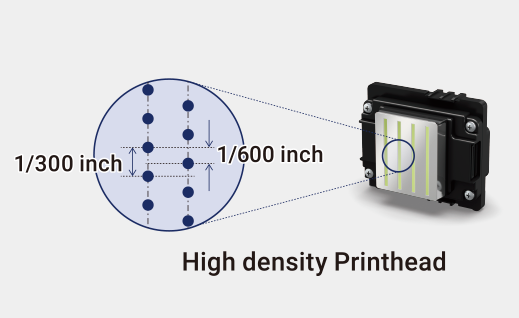
- High-resolution output up to 600 dpi per color
- Variable droplet technology for smoother gradients
- Stable ink jetting and color consistency
- Compatibility with multiple industrial printing applications
Compared with previous generations such as the Epson DX5, the I3200 offers significantly higher productivity while maintaining excellent print quality.
Epson I3200 Printhead Series Overview
Although all I3200 printheads share the same basic architecture, they are optimized for different ink chemistries.
| Model | Ink Type | Primary Applications |
|---|---|---|
| Epson I3200-A1 | Water-based inks | Sublimation, DTG, textile printing |
| Epson I3200-E1 | Eco-solvent inks | Signage, banners, vehicle graphics |
| Epson I3200-U1 | UV inks | UV flatbed, UV roll-to-roll, UV DTF |
Selecting the correct printhead is essential because each model uses different materials and internal structures designed to handle specific ink properties.
a. Epson i3200 A1 Printhead: Designed for Water-Based Inks
Compatible Inks: Water-based inks (such as sublimation, pigment, and dye inks)
Key Features:
- Specifically designed for water-based ink systems, not suitable for UV or solvent ink systems.
- Offers a high print resolution of 600dpi×2-line, ideal for printing fine details and intricate patterns.
- The physical structure is not suitable for corrosive liquids, making it unsuitable for UV printing.
Ideal Applications:
- Sublimation Printing: Widely used for polyester fabrics, such as sportswear, home decor, etc.
- Direct-to-Garment (DTG): Supports water-based pigment inks, suitable for printing on fabrics and garments.
- Water-Based Digital Media: Suitable for wallpapers, labels, and banner printing.
Common Devices: Common in sublimation printers, leather sample printers, water-based photo paper printers, and more.
If you mainly use water-based ink systems such as sublimation, DTG, or textile printing, the Epson I3200-A1 is usually the most suitable option. To keep it stable in long-term production, proper operation and regular maintenance are also important. You can read our Epson I3200-A1 printhead usage and maintenance tips for more practical guidance.
b. Epson i3200 U1 Printhead: Designed for UV Inks
Compatible Inks: UV inks (rigid or flexible)
Key Features:
- Developed specifically for UV ink systems, with enhanced corrosion protection.
- Supports white ink and varnish printing, offering flexible multi-channel control.
- Built-in heating helps improve ink flow, ensuring stable and consistent printing.
- High-precision droplet control for high-resolution output, ideal for intricate designs.
Ideal Applications:
- UV Flatbed Printers: Perfect for printing on rigid materials such as acrylic, glass, metal, and PVC.
- UV Roll-to-Roll Printers: Suitable for flexible materials like soft films, lightbox materials, PET, and PP.
- UV DTF (Direct-to-Film): Suitable for cold transfer applications.
Common Devices: Used in A3/A2 UV printers, 60cm roll-to-roll UV printers, and leather UV sample printers.
c. Epson i3200 E1 Printhead: Designed for Eco-Solvent Inks
Compatible Inks: Eco-solvent / mild-solvent inks
Key Features:
- Features a solvent-compatible structure with corrosion resistance between the A1 and U1 models.
- Encased in corrosion-resistant resin, ideal for outdoor and oil-based printing applications.
- Slightly more precise than the traditional DX5 printhead, offering more stable output.
Ideal Applications:
- Photo and Banner Printing: Suitable for applications like advertising signs, banners, and posters.
- Lightbox Fabrics, Vehicle Decals: Perfect for outdoor advertising, vehicle wraps, and lightbox fabric that require water and UV resistance.
- Solvent-Based Printing Needs: Ideal for outdoor, waterproof, and UV-resistant prints.
Common Devices:
Common in eco-solvent printers, solvent-based signage printers, and roll-to-roll solvent printers.
Get professional advice and competitive pricing on Epson i3200-A1, E1, and U1 models.
Epson I3200 U1 vs E1: What Are the Differences?
| Printhead | I3200 Printhead - U1 | I3200 printhead - E1 |
| Ink Type | UV ink | Eco-solvent ink |
| Weight (g) | 82 | |
| Nozzle Numbers | 3200 | |
| Nozzle Spacing (inch) | 1/300 | |
| Nozzle Rows | 8 | |
| Resolution | 300 npi/1 row, 600 npi/2 row | |
| Max. Supported Colors | 4 | |
| Print Width | 33.8 | |
| Jetting Frequency | 43.2 kHz (single dot), 21.6 kHz (multi dot) | |
| Drop Volume | 5 pl (single dot) | 6 pl (single dot) |
| 6 pl, 12.5 pl (single dot) | 6.3 pl, 12.3 pl (single dot) | |
| Ink Viscosity | 5~7 | 3~4 |
| Position | Positioning hole | |
(i3200 printhead specifications)
Why Ink Compatibility Matters
UV ink contains a much higher solid content than eco-solvent ink. As a result, UV inks generally have higher viscosity and require different printhead materials and ink channel designs.
Using eco-solvent ink in a UV printhead may cause unstable droplet formation and increased ink misting.
Using UV ink in an eco-solvent printhead can lead to nozzle clogging, poor jetting performance, and significantly reduced printhead lifespan.
For optimal performance, always match the printhead model with its intended ink type.
Ink Selection Principles for Epson I3200 Printhead
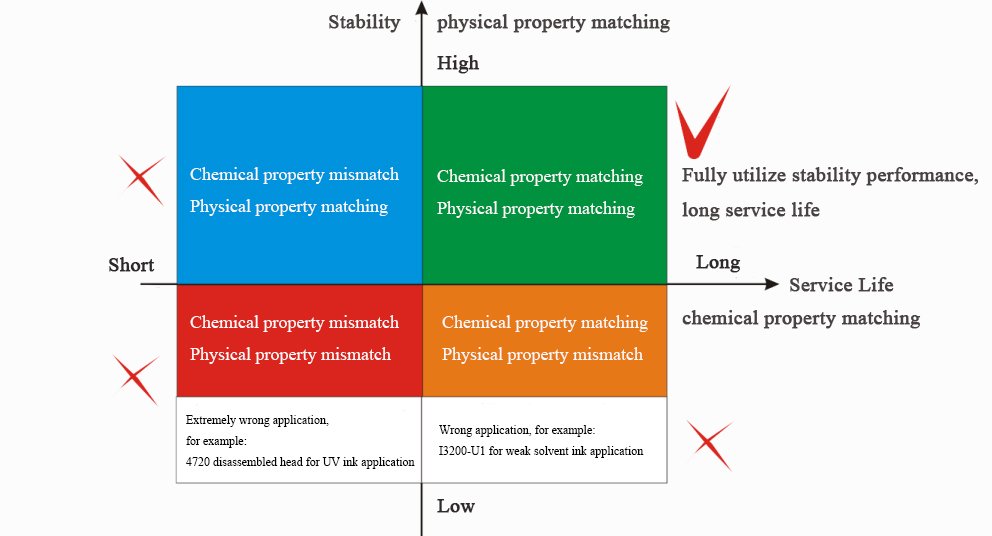
From the ink-matching point of view:
- Chemical properties (composition, material, etc.) affect service life.
- Physical properties (viscosity, surface tension, etc.) affect output stability.
As shown in the picture above, when choosing Epson I3200 series printheads, you should make a professional choice according to Epson's printhead guidelines.
Different printheads correspond to different ink solutions and professional ink circuit designs and boards; the I3200 U1 copes with the UV ink solution, and the I3200-E1 deals with an eco-solvent ink solution. Professional products do professional work and can better reflect professional standards.
How to Choose the Right Epson I3200 Printhead?
Based on your printing needs, here’s a quick guide to help you select the appropriate Epson i3200 printhead:
a. Epson I3200-A1 Printhead
Ideal for textile and graphic applications such as:
- Sublimation printing
- DTG (Direct-to-Garment) printing
- Water-based pigment or dye inks
b. Epson I3200-U1 Printhead
Best suited for:
- Glass, acrylic, wood, metal, PET, and other rigid substrates
- UV flatbed printers
- UV roll-to-roll systems
c. Epson I3200-E1 Printhead
Recommended for:
- PP paper, vinyl, and lightbox film
- Vehicle decals and outdoor signage
- Eco-solvent or solvent-based printing systems
Epson I3200 vs XP600, 4720, 5113, and S3200: Quick Comparison
The Epson I3200 is currently the most balanced choice for many digital printing businesses. It offers a strong combination of speed, precision, ink compatibility, and production stability. For new printer purchases or professional production upgrades, the I3200 is often a safer long-term choice than the XP600, 4720, or 5113.
The Epson S3200 is positioned above the I3200. It is designed for customers who need higher productivity, wider print width, and industrial-scale output. However, it also requires a greater investment and is usually better suited to medium- to large-scale production lines.
Simple Selection Advice
Choose XP600 if you need a low-cost solution for small-volume printing.
Choose 5113 if your machine is mainly used for stable water-based printing.
Choose 4720 if you need a lower-cost replacement for older compatible systems.
Choose I3200 if you want a balanced solution for speed, quality, and reliability.
Choose S3200 if your focus is high-speed industrial production and maximum output capacity.
For users comparing older and mainstream Epson printheads, our Epson 5113 vs. 4720 vs. I3200 printhead comparison explains the differences in speed, stability, ink compatibility, and upgrade requirements.
For higher-end industrial production needs, you can also check our Epson S3200, I3200, and 4720 printhead differences to understand how S3200 compares with I3200 and 4720 in productivity and application positioning.
Conclusion
The Epson I3200 printhead series has become a leading solution in industrial digital printing thanks to its high speed, precision, and reliability.
While the I3200-A1, I3200-E1, and I3200-U1 share a common platform, each model is specifically designed for a different ink system. Choosing the correct printhead is critical to achieving optimal performance and avoiding costly maintenance issues.
Understanding these differences will help you maximize print quality, improve production efficiency, and extend the lifespan of your printing equipment.
FAQ
The lifespan depends on usage conditions, ink type, maintenance, and environment. With proper operation and maintenance, the I3200 printhead typically lasts 1–3 years.
In most industrial applications. The I3200 provides:
Higher nozzle count (3200 vs 1440)
Faster printing speed
Better grayscale control
More stable production output
For new printer development, the I3200 has largely replaced the DX5.
In most cases, yes—but only with system modification. The I3200 offers higher speed, better nozzle density, and improved stability compared to the DX5. However, compatibility depends on the printer’s hardware and control system.
The I1600 is a cost-effective version of the I3200:
I1600 → 1600 nozzles, lower speed, lower cost
I3200 → 3200 nozzles, higher speed, higher productivity
Both offer similar image quality, but the I3200 is better for high-volume production.
The main difference is ink compatibility:
I3200-A1 → Water-based inks (sublimation, pigment, dye)
I3200-E1 → Eco-solvent inks for signage and outdoor graphics
I3200-U1 → UV inks for rigid and industrial materials
Each model is designed for a specific ink system and is not interchangeable.