In every wide-format printer, precision matters. The printer encoder strip, also called a linear scale or raster strip, is a key component that helps ensure accurate printhead positioning and stable image output.
Together with the decoder sensor, also known as the encoder reader, the printer encoder strip provides real-time position feedback to the printer control system. This allows the printhead carriage to move accurately, fire ink at the correct position, and produce sharp, aligned, and consistent prints.
Whether you are running an eco-solvent or solvent printer, UV flatbed or UV roll-to-roll printer, DTF printer, DTG printer, sublimation printer, or direct-to-fabric digital textile printer, understanding the printer encoder strip can help you maintain print quality and avoid costly downtime.
If you are replacing an Epson encoder strip, Roland encoder strip, or Mimaki encoder strip, the basic function is the same: the strip acts as a precise positioning ruler for the printhead carriage. However, the length, marking resolution, material, and sensor compatibility may vary by printer brand and model.
What Is a Printer Encoder Strip (Carriage Scale)?
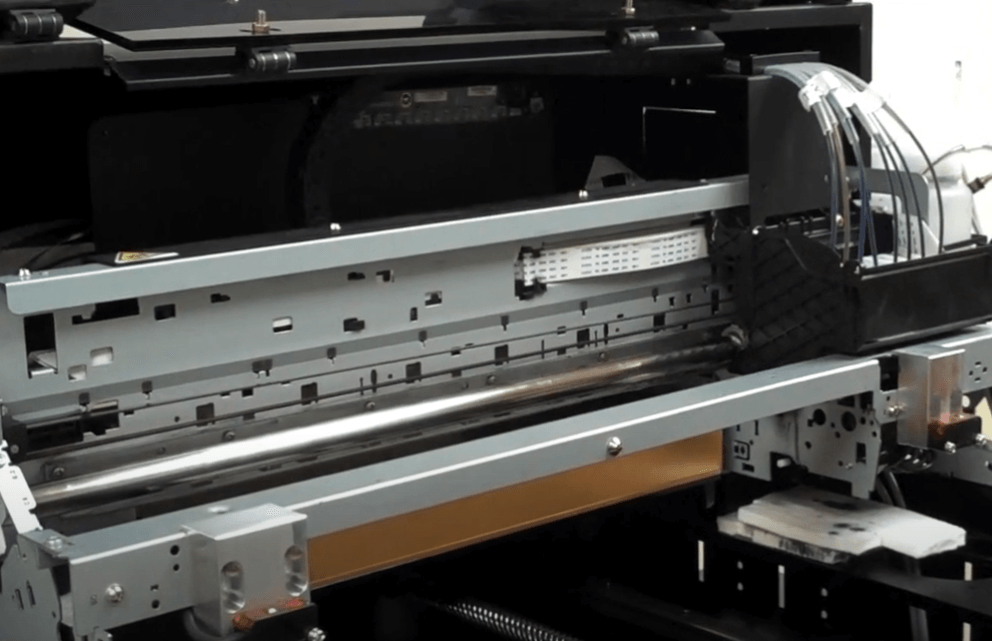
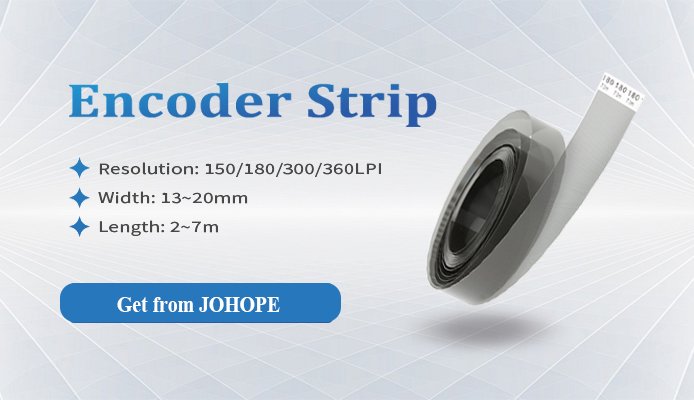
A printer encoder strip is usually a transparent film strip or metal ruler printed with evenly spaced marks, lines, or dots. It is installed along the movement path of the printhead carriage and works like a coordinate ruler inside the printer.
During printing, the carriage moves back and forth across the printer. The decoder sensor reads the marks on the printer encoder strip and sends position signals to the printer’s mainboard. Based on these signals, the control system knows the exact position of the printhead at every moment.
If the printer encoder strip becomes dirty, scratched, loose, or damaged, the printer may miscalculate the carriage position. This can cause printing problems such as image shifting, ghosting, color overlap, banding, inaccurate alignment, or carriage movement errors.
Why Is the Printer Encoder Strip Important?
The printer encoder strip plays a critical role in printhead movement and image positioning. It directly affects carriage accuracy, ink firing timing, and final print quality.
Positioning the Printhead
The printer encoder strip helps the printer determine where the printhead carriage starts, moves, and stops during printing. Without accurate position feedback, the carriage cannot move precisely.
Defining the Print Area
The decoder sensor reads the strip markings to ensure that the image is printed in the correct area. This helps prevent image shifting, duplication, or misalignment.
Ensuring Movement Accuracy
Each mark on the encoder strip corresponds to a specific position. By reading these marks, the printer can track every micro-movement of the carriage and maintain stable output.
Supporting Accurate Ink Firing
The mainboard uses encoder feedback to control ink ejection timing. If the signal is unstable, ink may be fired at the wrong position, resulting in blurred edges, ghosting, or overlapping colors.
What Does the Decoder Sensor Do?
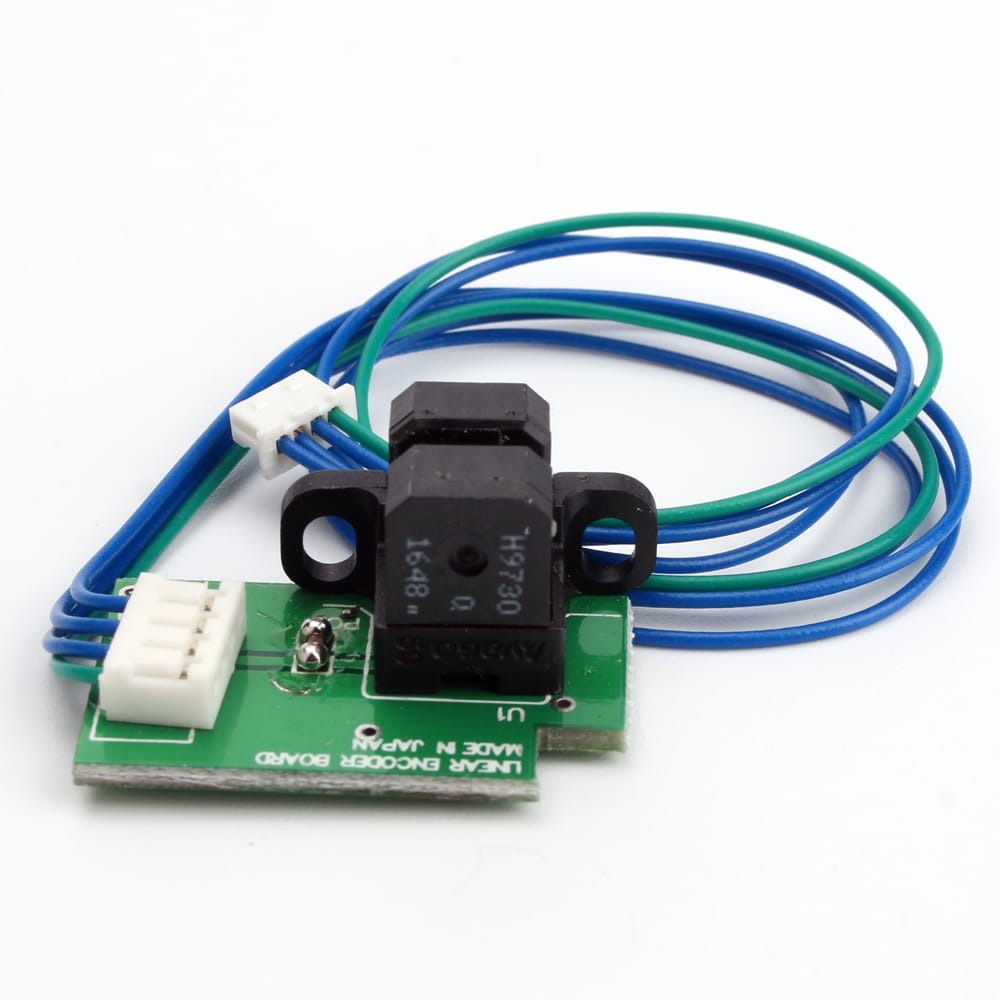
The decoder sensor, also called an encoder reader or raster sensor, is mounted on the printhead carriage. It scans the markings on the printer encoder strip and converts them into electrical pulse signals.
Main functions include:
Reading Position Data
The sensor detects the transparent-and-opaque or black-and-white markings on the printer encoder strip and sends position signals to the mainboard.
Synchronizing Ink Firing
The mainboard uses the encoder signal to control when the printhead ejects ink. This ensures that each ink drop lands in the correct position.
Detecting Motion Errors
When carriage movement becomes unstable, the sensor may lose signal tracking. In this case, the printer may stop printing to prevent further damage or printing errors.
How to Choose the Right Encoder Strip (Raster)?
Choosing the right printer encoder strip starts with print resolution and machine compatibility. Print precision plays an important role in achieving high-quality output, so the raster resolution should match or be a suitable multiple of the required horizontal printing resolution.
For example, if you want to print at 360 × 720 DPI, only the horizontal X-axis resolution matters when selecting the encoder strip. The vertical Y-axis resolution is not the key factor for the strip.
At first, it may seem that a 360 DPI raster is required. This can be correct, but it is not the only option. A raster strip can also work if its resolution is a suitable multiple of the target print resolution.
For example, a 180 DPI raster can support horizontal resolutions such as:
- 180 DPI
- 360 DPI
- 540 DPI
- 720 DPI
However, the decoder sensor must match the encoder strip. A 180 DPI decoder should be used with a 180 DPI raster strip. If the decoder and strip do not match, the printer may fail to read the movement signal correctly.
When replacing a printer encoder strip, always confirm the exact printer model and original part specification. For example, an Epson printer encoder strip should match the correct Epson-based printer structure and decoder sensor. A Roland printer encoder strip should match the Roland carriage system and sensor. A Mimaki printer encoder strip should match the original raster resolution and sensor type used by the machine.
Some advanced printer control systems support arbitrary DPI printing. In this case, the system uses displacement algorithms based on encoder readings to calculate different resolutions. This provides more flexibility, but final print accuracy depends on the manufacturer’s control algorithm and system stability.
How to Install the Printer Encoder System Correctly
How to Install the Printer Encoder System Correctly
After choosing the correct printer encoder strip, proper installation is the most important step.
A typical raster decoder has four wires:
Power: 5V and 5V GND
Signal: A and B
The power wires are fixed, but the A and B signal wires may vary depending on the installation direction of the decoder. This is why some users find that a newly installed decoder does not work correctly. In some cases, the A and B signal wires may need to be swapped.
Many printer users experience problems after replacing the encoder strip or decoder sensor, such as incorrect gear ratio readings, carriage movement errors, or print stoppages. In many cases, these issues are caused by incorrect installation rather than a defective component.
Two installation points are especially important:
1. Keep the Sensor Slot Centered
The printer encoder strip should pass through the decoder sensor slot smoothly. It must be centered and must not touch or rub against the sensor during carriage movement.
2. Keep the Sensor Perpendicular to the Strip
The decoder sensor should be installed perpendicular to the encoder strip. The angle deviation should generally be no more than 2°. If the sensor is tilted, the reading may become unstable and cause printing errors.
Correct alignment ensures accurate signal reading and smooth printer operation.
Common Problems Caused by Printer Encoder Strip Errors
When a printer has print quality or movement issues, do not overlook the encoder system. A dirty, scratched, loose, or faulty printer encoder strip can cause several common problems.
Before replacing expensive components such as printheads, mainboards, or carriage motors, check whether the Epson encoder strip, Roland encoder strip, or Mimaki encoder strip is dirty, scratched, loose, or incorrectly installed. In many cases, cleaning or replacing the encoder strip can solve common printing problems.
No Ink Output
Even if the printhead, ink system, and control boards are working normally, the printer may fail to eject ink if the encoder signal is missing.
Possible causes include:
- The decoder sensor cannot detect movement on the encoder strip.
- The mainboard does not receive a valid position signal.
- The signal cable is loose or damaged.
- The printer encoder strip is too dirty or misaligned.
Before replacing expensive parts such as printheads or mainboards, check the encoder strip, sensor, and signal cable connections first.
Misaligned, Blurred, or Ghosted Prints
If the printed image appears shifted, duplicated, blurred, or jittered, the printer encoder strip may be the cause.
Possible causes include:
- Dust or ink mist on the encoder strip
- Scratches on the strip surface
- Loose or unstable encoder strip tension
- Sensor misalignment
- Inconsistent reading due to dirt inside the sensor
When the sensor cannot read the strip accurately, the printer may make micro-positioning errors, resulting in ghosting, color overlap, or image deviation.
Carriage Stops or Moves Erratically
If the carriage stops during printing, pauses unexpectedly, or moves irregularly, the encoder sensor may have lost tracking.
Possible causes include:
- Encoder signal interruption
- Dirty sensor slot
- Loose signal cable
- Incorrect A/B signal wiring
- Sensor not centered with the strip
- Encoder strip rubbing against the sensor
The printer may stop movement as a safety response when it cannot receive stable position feedback.
What to Do If the Printer Encoder Strip Is Dirty
If the printer encoder strip becomes dirty, it should be cleaned in time. Do not continue printing for a long period with a dirty encoder strip, because it may cause repeated positioning errors and waste materials, ink, and production time.
Before cleaning, always power off the printer and move the carriage carefully according to the machine’s maintenance instructions.
Recommended cleaning tools:
- Lint-free cloth
- Clean cotton swab
- Dust blower
- High-purity alcohol, only when needed
- Protective gloves
Avoid using ordinary tissues, dirty rags, water, strong solvents, or unknown cleaning liquids.
Printer Encoder Strip Cleaning Method
First, use a dust blower to remove large dust particles from the strip surface. This helps avoid scratching the strip during wiping.
Then, use a lint-free cloth or clean cotton swab to gently wipe the printer encoder strip. Always wipe in one direction only. Do not rub back and forth, because this may damage the surface or leave fibers and residue.
If dry wiping is not enough, slightly moisten the cloth or swab with alcohol and wipe the strip gently in one direction from one end to the other. Alcohol is commonly used because it evaporates quickly and does not remain on the component for long.
Important cleaning precautions:
- Do not scratch the encoder strip.
- Do not bend or deform the strip.
- Do not wet the strip excessively.
- Do not use strong chemical cleaners.
- Do not wipe back and forth repeatedly.
- Do not touch the strip directly with oily hands.
- Make sure the strip is completely dry before restarting the printer.
Improper cleaning may cause worse reading errors and may lead to ghosting in the next print job.
Cleaning the Encoder Sensor
In addition to cleaning the printer encoder strip, the encoder sensor should also be checked. On many digital textile printers, the sensor is located under or near the carriage board. Some machines may position it close to the printhead carriage area.
You can move the carriage carefully to the left or right side to access the sensor area. Use a dust blower to remove dust from the sensor slot. If necessary, use a clean swab with a small amount of alcohol to gently clean the sensor area.
Do not pour or spray large amounts of liquid directly into the sensor. For valuable printer components, cleaning should be done carefully and gently. If you are not familiar with the machine structure, contact a technician before disassembling or cleaning internal parts.
Cleaning the Encoder Disk
Some printers also use an encoder disk, also called a raster disk or rotary encoder disk, usually related to motor or media feeding control. If the encoder disk becomes dirty, it may also affect movement accuracy.
In many machines, the encoder disk can be found after removing the dust cover. After removing the cover screws, you may see the encoder disk and its sensor. Use a lint-free cloth or cotton swab with a small amount of alcohol to clean it gently.
As with the linear encoder strip, do not scratch, bend, or wet the encoder disk. Allow it to dry completely before restarting the printer.
Daily Maintenance Tips for the Printer Encoder System
Regular maintenance of the printer encoder strip and decoder sensor can help extend machine lifespan and maintain stable printing quality.
Keep the Working Environment Clean
A clean production environment reduces dust, ink mist, and fabric lint buildup. This is especially important for direct-to-fabric, DTF, DTG, sublimation, eco-solvent, solvent, and UV printing environments.
Control Temperature and Humidity
The recommended operating environment is usually:
Temperature: 18°C–30°C
Relative humidity: 30%–70%, without condensation
Stable temperature and humidity help reduce static electricity, ink instability, and dust adhesion.
Maintain Proper Ventilation
A well-ventilated environment helps remove ink mist, fumes, and airborne particles. For some production environments, an overhead exhaust fan with around 600 CFM airflow may be recommended, depending on the machine type, ink type, and workshop layout.
Avoid Strong Light Interference
Since encoder systems rely on optical reading, strong direct light may affect sensor stability in some situations. A clean, low-glare, and well-managed workspace is preferred.
Inspect the Encoder Strip Regularly
Check the printer encoder strip for:
- Dust
- Ink mist
- Scratches
- Loose installation
- Oil stains
- Rubbing marks
- Warping or deformation
Clean it promptly when dirt is found.
Use Compatible Replacement Parts
When replacing the encoder strip, decoder sensor, signal cable, or carriage assembly, use parts that match the printer model and control system. Incorrect parts may cause signal mismatch and unstable printing.
Keep Your Printer Running Smoothly
The printer encoder strip may be a small part of a wide-format printer, but it has a major impact on print accuracy, carriage movement, ink firing timing, and final image quality.
A dirty or misaligned printer encoder strip can cause ghosting, color overlap, image shifting, carriage stopping, or even no ink output. Regular inspection, correct cleaning, proper installation, and the use of compatible high-precision parts can help keep your printer running smoothly.
Need encoder parts for your printer?
We supply compatible printer encoder strip solutions for different wide-format printer brands, including Epson encoder strip, Roland encoder strip, and Mimaki encoder strip options. Whether you need an encoder strip, decoder sensor, encoder disk, signal cable, or carriage-related spare parts, our team can help you match the right part according to your printer model.