In digital inkjet printing equipment such as large-format printers, eco-solvent printers, and UV flatbed printers, stable performance relies not only on printheads and ink systems but also on precise motion control.
Among these components, the limit switch plays a critical yet often overlooked role. It ensures accurate positioning and protects the machine from mechanical damage during operation.
What Is a Printer Limit Switch?
A limit switch is an electrical component that detects the position of moving parts in a printer. It is typically installed at the ends of motion paths, such as carriage rails or platform edges.
When a moving part (like the printhead carriage) reaches a predefined position, the switch is triggered and sends a signal to the control system to stop, reset, or adjust movement.
In simple terms:
- It defines movement boundaries
- It prevents overtravel and collisions
Key Functions of a Limit Switch in Printers
1. Travel Limitation & Safety Protection
Limit switches serve as boundary checkpoints, preventing components from exceeding safe limits.
Benefits include:
- Preventing printhead crashes
- Avoiding rail or belt damage
- Reducing mechanical wear
2. Home Position Detection
During startup or reset, printers perform a homing process to locate the starting point. Limit switches help identify this exact position.
Impact on printing:
- Accurate print alignment
- Consistent repeat jobs
- Reduced image shifting or ghosting
3. Emergency Stop & Fault Feedback
If abnormal movement or mechanical failure occurs, the limit switch can instantly trigger a stop signal or alarm.
Why it matters:
- Protects expensive printheads
- Prevents further equipment damage
- Enhances operator safety
4. Automation Process Control
Limit switches are also involved in automated routines such as cleaning, capping, and carriage return cycles, ensuring each step is executed correctly.
Types of Limit Switches Used in Printers
Mechanical Limit Switch
Triggered by physical contact (lever or button).
Advantages:
- Simple design
- Cost-effective
- Easy replacement
Consideration:
- Subject to wear over time
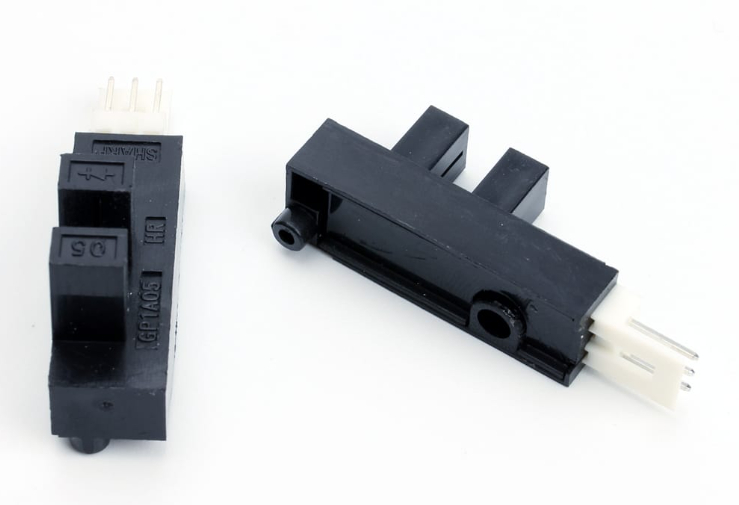
Optical (Photoelectric) Limit Switch
Uses infrared or light beams for non-contact detection.
Advantages:
- High precision
- Fast response
- No physical wear
Application:
- High-end UV and photo printers
Magnetic Limit Switch
Detects position through magnetic field changes.
Advantages:
- Strong resistance to dust and contaminants
- Suitable for harsh environments
- Long service life
Common Applications in Printing Equipment
Limit switches are widely used across various printer types:
- Large-format / eco-solvent printers – carriage left/right positioning
- UV flatbed printers – Z-axis height control to prevent head crashes
- Roll-to-roll printers – media edge detection
- Textile printing machines – fabric alignment and positioning
- Coding & marking systems – synchronized motion control
Typical installation points include the following:
- X/Y/Z axis endpoints
- Carriage rail edges
- Platform boundaries
Common Failure Symptoms
A faulty or worn limit switch may cause the following:
- Carriage failing to return to the home position
- Initialization errors at startup
- Print misalignment or shifting
- Unexpected collisions or abnormal stops
Early detection is essential to avoid costly repairs.
Maintenance Tips for Longer Lifespan
Regular Cleaning
Keep sensors free from ink mist, dust, and moisture—especially for optical types.
Warm-Up in Cold Environments
In low temperatures, internal lubrication may thicken. Let the machine idle for 10–15 minutes before operation.
Scheduled Replacement
Mechanical switches: every 6–12 months
Optical/magnetic switches: based on usage and performance
Routine Homing Test
Perform weekly checks to ensure accurate return-to-home positioning.
Avoid Improper Handling
Do not force operation when errors occur. Seek professional inspection instead.
Selection Tips for Printer Limit Switches
When choosing a replacement or new limit switch, consider:
- Connector type and voltage compatibility
- Mounting size and structure
- Signal type (normally open / normally closed)
- Compatibility with your printer model
Proper selection improves reliability and reduces downtime.
Conclusion
Although small in size, the limit switch is a vital component in any inkjet printing system. It ensures that movement stays controlled, positioning remains accurate, and equipment operates safely.
It defines how precisely your printer moves
And how safely it stops
For businesses relying on consistent print quality and machine uptime, investing in reliable limit switches—and maintaining them properly—is essential.