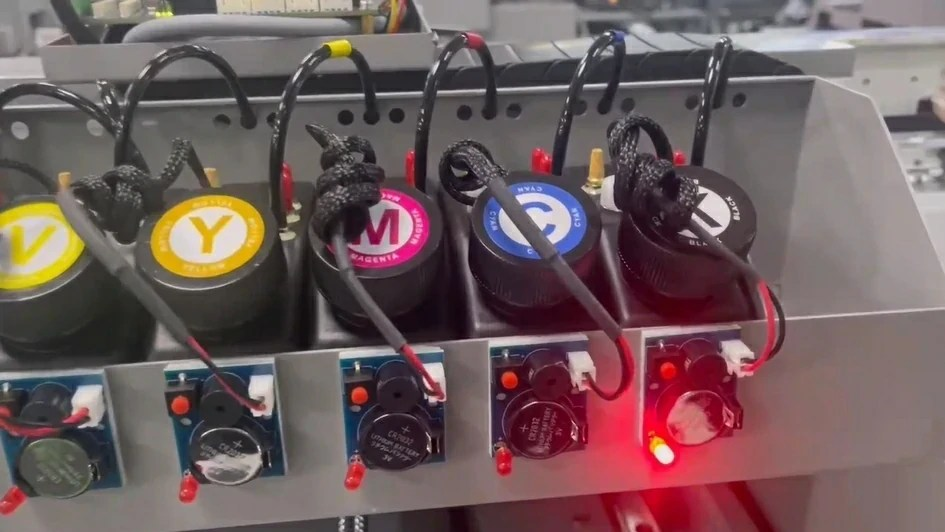
Nowadays, most UV flatbed printers are equipped with a continuous ink supply system, which we will refer to as "continuous supply" below. The main feature of continuous supply is that it is convenient to add ink and the cost of use is extremely low. However, don't underestimate the simple action of adding ink. Many users have unnecessary losses due to improper habits when adding ink. Here are some simple points:
Precautions When Adding Ink
First: Choose high-quality and compatible ink to add. After using the ink that comes with the CISS, many customers buy some ink to add to the CISS because they want to save money or convenience. They think that it doesn’t matter what ink they add to the CISS outer ink cartridge. However, they ignore the fact that the key to whether the CISS is easy to use is ink. After adding ink, printing often causes blockage, disconnection, and color cast. Therefore, everyone should try to choose high-quality ink. In addition to high quality, you should also pay attention to whether the added ink is compatible with the original residual ink. Many customers have nozzle corrosion and agglomeration caused by the chemical reaction between the two inks.
Second: When adding ink, do not lift the ink cartridge too high for the sake of convenience, as this will cause pressure imbalance, ink overflowing from the nozzle, causing a short circuit in the printhead, and burning the motherboard.
Third: Before adding ink, you must first seal the continuous supply vent, then add ink to the ink-filling hole, and then restore it to its original state, that is, unplug the vent after the ink hole is plugged. Remember that there should not be too much ink in the vent chamber. If the ink level in the vent is too high, the ink pressure will change and cause a poor inkjet.
Fourth: Before adding ink to the continuous supply of a printer with an integrated printhead and ink cartridge, it is best to take the continuous supply and ink cartridge out of the machine together and then add ink. The pressure of the continuous supply is always balanced during the use process. Suddenly adding ink to the outer cartridge will cause a short-term pressure imbalance, and ink will overflow from the nozzle and short-circuit the cartridge circuit. Therefore, it is recommended that you take out the continuous supply before adding ink, and wait until the pressure of the inner and outer cartridges is balanced before using the machine. If the ink overflows, you can use toilet paper to wipe the nozzle ink until it is balanced, and then use the machine. Be sure to wipe the metal contacts of the ink cartridge clean before using the machine.
Ink Supply System of a UV Flatbed Printer: Troubleshooting
The ink supply system of a UV flatbed printer is particularly prone to failure during use. If the ink supply system fails during use and there is no technician to solve it, it is better to understand the troubleshooting method when the nozzle is blocked.
If you find that there is a lot of resistance when drawing ink with a syringe and no ink flows into the syringe, it can be determined that the pipeline is blocked. Please deal with the following situations that cause pipeline blockage in a timely manner:
1. The ink outlet is clogged.
Put the sealing plug on the external cartridge in place, turn it upside down, pull out the ink tube from the external cartridge, and check if it is clogged. If it is clogged, insert the needle of a syringe into the ink outlet.
2. The ink injection elbow is clogged.
Pull out the ink injection elbow from the ink cartridge, and then pull out the ink injection elbow from the ink supply line to check whether it is clogged. If it is clogged, rinse the elbow with clean water and blow it with your mouth.
3. The ink delivery pipeline is blocked
When the ink outlet and the ink injection elbow are not blocked, use a syringe to draw ink from the ink outlet of the ink cartridge. If the ink level in the external ink cartridge does not float down, if it is blocked, first check whether there are foreign objects at both ends of the ink delivery pipeline that cause blockage. If there are small crystals or foreign objects, use a straightened paper clip to remove them; if the blockage is in the long pipeline, please contact the local dealer to purchase a new six-row pipeline or a four-row pipeline.
If none of the above three possibilities is true, it can be determined that the air filter of the external ink cartridge is clogged. The air filter should be flushed and the water should be dried.