Ink is usually filtered during production before it leaves the factory. So why do industrial inkjet printers still experience clogged printheads, ink starvation, missing nozzles, and unstable printing?
The reason is simple: factory-filtered ink does not mean the printer’s ink path no longer needs filtration.
During storage, transportation, and printing, ink may be affected by temperature changes, mechanical stress, air exposure, tubing, pumps, valves, and other components. These factors can introduce or generate particles, sediments, or other contaminants.
An ink line filter provides an additional layer of protection, helping prevent these contaminants from reaching the printhead.
This guide explains the main types of ink filters, how to choose the right one, where to install it, and what risks to consider.
Why Does Factory-Filtered Ink Still Need an Ink Line Filter?
Factory filtration mainly controls the cleanliness of the ink when it leaves the manufacturer.
Once the ink enters a printer, it passes through multiple components, including:
- Ink tanks and cartridges
- Ink pumps
- Valves and connectors
- Tubing
- Heaters
- Degassing modules
- Circulation systems
Each stage can potentially introduce particles or contribute to ink degradation.
Common sources of contamination include:
- Sediment formed during storage
- Residues inside ink lines and fittings
- Particles generated during pumping
- Deposits caused by heating
- Material particles from components
- Dried ink or residue after long periods of inactivity
Even very small particles can affect precision printheads.
That is why ink line filtration is an important part of industrial inkjet ink management.
What Does an Ink Line Filter Do?
Remove Particles and Protect the Printhead
Industrial printheads have extremely small nozzles and require clean, stable ink.
An ink filter helps capture particles, dust, and certain sediments before they reach the printhead, reducing the risk of:
- Nozzle clogging
- Ink starvation
- Missing nozzles
- Inkjet deflection
- Unstable ink output
- Banding and color inconsistency
For industrial inkjet printers, effective filtration is an important part of maintaining consistent print quality.
Protect the Ink Supply System
Filters do more than protect the printhead.
By removing hard particles from the ink, they can also help reduce contamination in pumps, valves, tubing, and other ink supply components.
A properly designed filtration system can therefore reduce maintenance frequency and help lower long-term operating costs.
Main Types of Industrial Ink Filters
Industrial inkjet ink filters can generally be divided into two main categories:
- Metal mesh filters
- Polymer membrane filters
Polymer membrane filters commonly include bag filters and capsule filters, depending on their design and application.
Each type has distinct characteristics regarding filtration area, chemical resistance, dirt-holding capacity, pressure drop, and installation location.
If you are new to printer filtration and want a simpler overview of the basic functions, structures, and common filter designs used in printing equipment, see our guide to printer ink filter types and functions.
Metal Mesh Filters
Metal mesh filters typically use stainless steel or other metal materials to capture particles through a woven mesh structure.
Filtration performance depends mainly on the wire diameter, mesh opening, and mesh structure. In some applications, filtration is specified by mesh count.
Advantages
- High temperature resistance
- Good mechanical strength
- Good resistance to certain chemicals
- Suitable for specialized operating conditions
- Useful for relatively coarse pre-filtration
Limitations
- Limited filtration area in some designs
- Lower dirt-holding capacity than many pleated membrane structures
- Pressure drop can increase quickly as contaminants accumulate
- May not be ideal for high-cleanliness, continuous-printing applications
Metal mesh filters are therefore more suitable for specific high-temperature, chemical, or pre-filtration applications rather than being universally better than membrane filters.
Polymer Membrane Filters
Polymer membrane filters are a major part in industrial ink supply systems.
Compared with simple mesh structures, membrane filters can use pleated or multilayer structures to increase the effective filtration area. This can improve dirt-holding capacity and filtration stability.
Two common designs are:
- Bag/capsule filters
- Disc or butterfly filters
Bag/Capsule Filters
Bag or capsule-style filters are commonly used for pre-filtration and ink circulation systems.
Their pleated membrane structure increases the effective filtration area within a compact housing, helping reduce the filtration load and extend service life.
They are suitable for:
- Industrial inkjet printers
- Continuous production
- Recirculating ink systems
- UV and solvent ink applications
- Systems requiring stable long-term filtration
For continuous-production equipment, a larger filtration area can help maintain stable flow and reduce premature filter clogging.
Disc/Bubble-Type Filters
Compact disc filters can be used as final-stage filtration before ink reaches the printhead.
Their main advantages include:
- Compact design
- Easy installation
- Simple replacement
- Relatively low cost
- Convenient for ink testing and low-flow applications
They can be suitable for:
- Non-recirculating inkjet systems
- Laboratory ink testing
- Low-flow ink supply
- Applications requiring frequent ink changes
However, their limited filtration area and dirt-holding capacity should be considered carefully when used in high-flow or continuous recirculating systems.
How to Choose the Right Ink Filter
Choosing an ink filter is not simply about selecting the smallest filtration rating.
You should consider:
- Ink type
- Required filtration rating
- Ink flow rate
- Working pressure
- Temperature
- Filtration area
- Dirt-holding capacity
- Chemical compatibility
- Pressure drop
- Printhead requirements
General Selection Guide
| Application | Recommended Filter Type | Key Considerations |
|---|---|---|
| Standard solvent ink | Polymer membrane filter | Filtration rating, solvent compatibility |
| UV ink | UV-compatible membrane filter | Chemical compatibility, pressure drop |
| Recirculating ink system | Bag/capsule filter | Filtration area, dirt-holding capacity |
| Low-flow/laboratory testing | Compact disc/butterfly filter | Cost and easy replacement |
| High-temperature applications | Metal mesh filter | Temperature and chemical resistance |
| Aggressive specialty inks | Compatible metal or membrane filter | Material compatibility |
A finer filter is not always a better filter.
An excessively fine filter can create higher pressure drop and may clog more quickly.
The goal is to select a filter that provides the required level of cleanliness without creating unnecessary resistance in the ink supply system.
Where Should an Ink Filter Be Installed?
Filter location has a direct impact on ink supply stability.
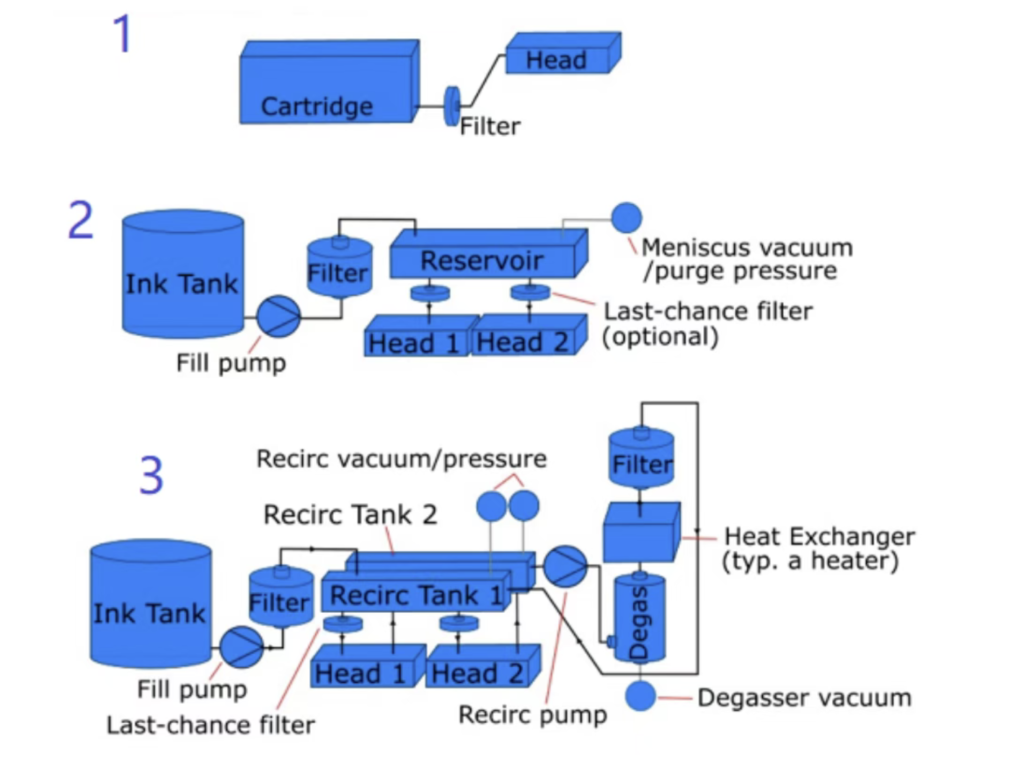
A basic principle is:
Install the filter after components that may generate or carry contaminants, while keeping pressure loss within the acceptable range of the ink supply system.
For example, depending on the printer design, filtration may be positioned after components such as pumps, heaters, or degassing modules.
A typical configuration may look like:
Ink Tank → Pump/Heater/Degassing → Filter → Pressure Regulation → Printhead
However, there is no universal layout for every printer. The actual position should be determined based on the ink, circulation method, pump flow rate, pressure requirements, and printhead specifications.
Why Should You Avoid Installing a Filter Directly at the Printhead Inlet?
Placing a filter close to the printhead may seem like the best way to provide final protection.
However, if the filter has a small filtration area, an overly fine membrane, or has already accumulated contaminants, its flow resistance can increase significantly.
For negative-pressure ink systems, changes in ink supply pressure can affect meniscus stability and potentially cause:
- Ink starvation
- Unstable nozzle firing
- Inkjet deflection
- Missing lines
- Printhead performance issues
If a filter must be installed close to the printhead, its initial pressure drop and pressure drop after contamination should be carefully evaluated.
Pressure monitoring can also be used in systems where stable negative pressure is critical.
Is More Filtration Always Better?
Not necessarily.
Adding more filters may improve particle control, but it also introduces additional:
- Flow resistance
- Pressure loss
- Maintenance points
- Replacement costs
- Potential contamination sources
A well-designed industrial ink supply system should focus on the right filtration stages and locations, rather than simply adding more filters.
Depending on the application, a system may use:
Pre-filtration → Circulation filtration → Final printhead protection
The exact configuration should be selected according to the printer and ink system.
Don’t Ignore the Risks Caused by the Filter Itself
Although filters protect printheads, an improperly selected or poorly maintained filter can also create problems.
Filter Clogging Can Increase Pressure Drop
As contaminants accumulate, the filter becomes more resistant to ink flow.
If it is not replaced in time:
Filter clogging → Increased pressure drop → Insufficient ink supply → Printhead ink starvation
Therefore, filter replacement should not always be based on a fixed time interval.
Ink cleanliness, flow rate, pressure difference, and actual operating conditions should also be considered.
An Improper Filter May Affect Ink Stability
Ink is a carefully formulated dispersion system.
Under high-flow or high-shear conditions, an unsuitable filter structure, membrane material, or filtration area may increase mechanical stress on the ink and potentially affect ink stability.
Therefore, filter selection should go beyond a single specification such as “5 μm” or “10 μm.”
You should also evaluate:
- Membrane material
- Ink compatibility
- Effective filtration area
- Flow rate
- Working pressure
- Temperature range
- Initial pressure drop
- Dirt-holding capacity
Five Key Parameters for Selecting an Industrial Ink Filter
When selecting a filter for an industrial inkjet printer, pay particular attention to these five parameters.
① Filtration Rating
Confirm the filtration requirements of the ink and printhead before selecting the appropriate membrane or mesh specification.
② Flow Rate
The filter must support the maximum required ink flow. Otherwise, excessive pressure loss may occur.
③ Chemical Compatibility
Make sure the membrane, housing, seals, and other wetted materials are compatible with the specific ink, such as UV, solvent, or water-based ink.
④ Filtration Area
For the same filtration rating, a larger effective filtration area can generally reduce the filtration load and improve dirt-holding capacity.
⑤ Pressure Drop
Do not only check the pressure drop of a new filter.
The pressure drop should also be monitored as contaminants accumulate during operation.
When Should an Ink Filter Be Replaced?
Consider inspecting or replacing the filter when you notice:
- Frequent ink starvation
- Increasing missing nozzles
- Abnormal ink pressure
- Longer pump operating time
- Reduced ink flow
- Increasing pressure difference across the filter
- Visible deposits inside the filter
- Significant improvement after installing a new filter
If print quality improves quickly after replacing the filter, the ink supply system and filter pressure loss should be investigated.
However, not every clogged printhead is caused by the filter.
Ink formulation, negative pressure, tubing, pumps, printhead condition, ambient temperature and humidity, and printer maintenance can all contribute to nozzle clogging.
Conclusion: Effective Filtration Is More Than “Filtering the Ink”
The goal of industrial ink filtration is not simply to achieve the finest possible filtration rating.
A good filtration system should provide:
Clean ink + Stable flow + Low pressure drop + Material compatibility
In simple terms:
Factory filtration
Controls ink cleanliness before delivery.
Ink line filtration
Helps control secondary contamination during storage and printing.
Final-stage filtration
Provides additional protection for the printhead.
Therefore, even when ink has already been filtered by the manufacturer, industrial inkjet printers may still require properly designed ink line filtration.
When selecting an industrial ink filter, consider filtration rating, membrane material, filtration area, flow rate, pressure drop, dirt-holding capacity, and chemical compatibility rather than focusing on filtration precision alone.
A properly designed filtration system is not simply a consumable component—it is an important part of maintaining stable ink delivery, reliable printhead performance, and consistent industrial printing quality.